

Help Centre
Variants
Product variants (or variations) are a useful feature to handle products with different sizes and colors without having to generate a separate product for each variant. All variants are connected to the main product but can still be handled as their own entities:
- Each variant combination has its own stock level, weight etc
- Each color variant has its own product image
- Each variant combination can even have a unique price (for example in children't clothing it is common that kid sizes are prices cheaper than adult sizes).
In variant-editor you can edit a variation combination by clicking the row/field active and altering information.
Main functions
Main functions for variants editor are:
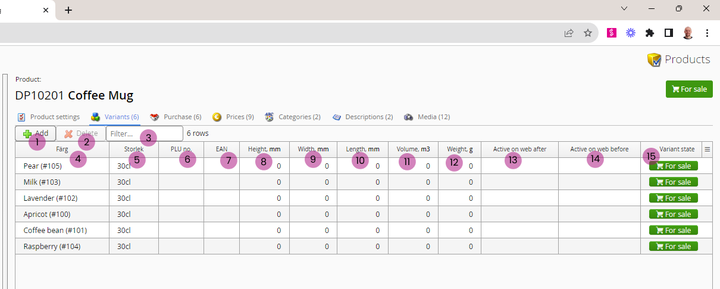
1. Add - Click this to add more variations and/or variation combinations for the product.
2. Delete - Deletes selected variants.
3. Filter - Filter the variant list to show anly the variants including the value given to filter field.
Variant fields
These fields contain variant-specific information. Not all of these fileds are mandatory but for the web store to function nicely we suggest having at least all fields marked with *).
It is also important to notice that this variant editor only handles variants that are created: If a certain size is not created, it also can not be added to a product.
There exists separate editors for creating new sizes and colors.
4. Color *) - Color variant: if product has different colors, this is important to have ;)
5. Size *) - Size variant: same thing as with color
6. PLU - Price Look-up code
7. EAN code - European Article Number, a variant unique number used for example to generate bar codes for products.
8. Height - Variant height in mm
9. Width - Variant width in mm
10. Length - Variant length in mm
11. Volume - Variant volume in m3 (is calculated automatically based in values in 8, 9 and 10 if values are given)
12. Weight *) - Variant weight in grams - NOTE! This weight is used by shopocart and checkout to calculate delivery costs to order.
13. Active on web after - Date used for product category sorting selection "newest". Does not schedule product publishing.
14. Active on web before - Date used for product category sorting selection "newest". Does not schedule product publishing and is not supported on all installations.
15. Variant state - Status of the variant: is it being sold online or not?
As with all editors, please remember to save & refresh after editing! :)
Still haven’t found what you’re looking for?
