

Help Centre
What’s new?
Learn what's new in the latest updates of Viskan platform.
All category managements are now in the new Viskan Backoffice (Backoffice)
Category trees can now be built and maintained directly in the new Viskan Backoffice. This means handling categories for products, customers, suppliers, campaigns and subscription templates. Categories can be added, renamed, reordered and deactivated, and each view has a membership panel where the connected items can be filtered, added and removed.
Product categories come in two variants, picked automatically per installation: E-commerce installations get the advanced version with sorting down to colour level and product grouping, while other installations get a slimmed-down version focused on the tree and its products.
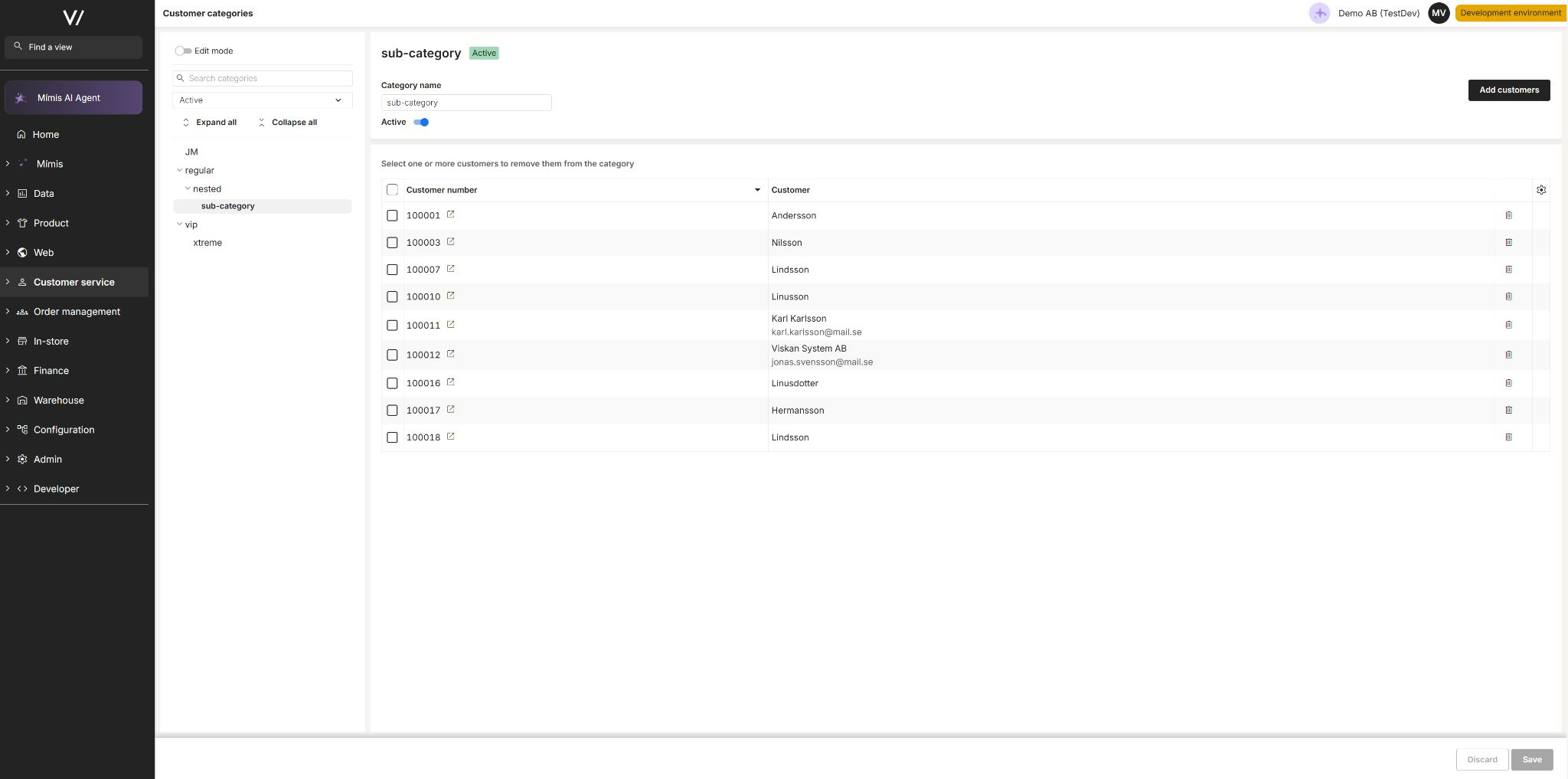
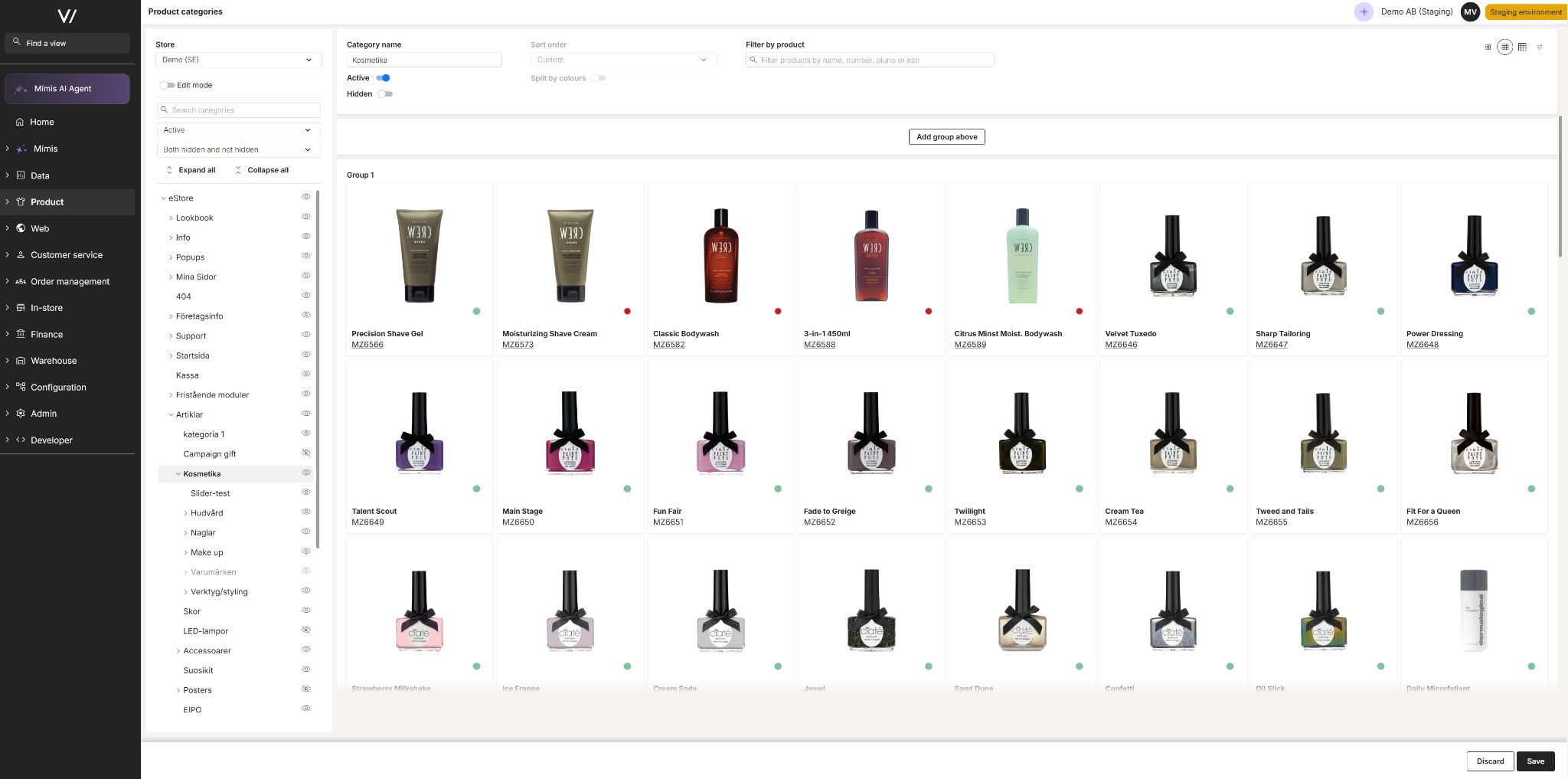
Property views for product categories, orders and campaigns (Backoffice)
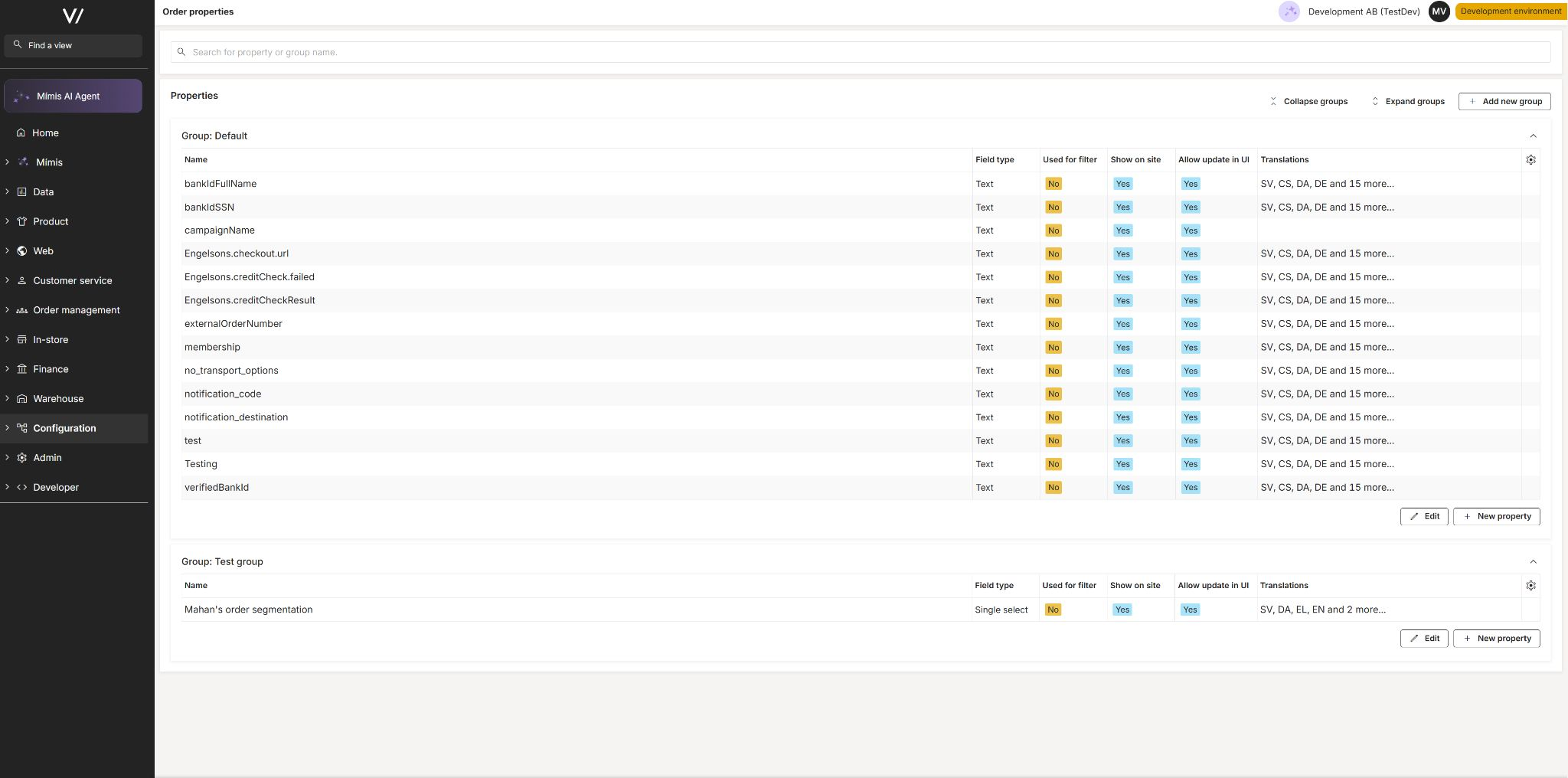
Property keys can now be set up for three last areas: product categories, orders and campaigns. Each has its own view in Viskan Backoffice for creating and maintaining the property keys, and assigning the property values are managed on the objects themselves.
Properties that allow multiple values now indicate it for text, whole number and decimal types. When assigning these properties the application automatically creates a new value for multi-valued properties, while replacing for the single-valued versions. The property views also got a round of polishing — a loading indicator while data is fetched, a clear message when no properties have been created yet, and a minor fix for saving yes/no properties.
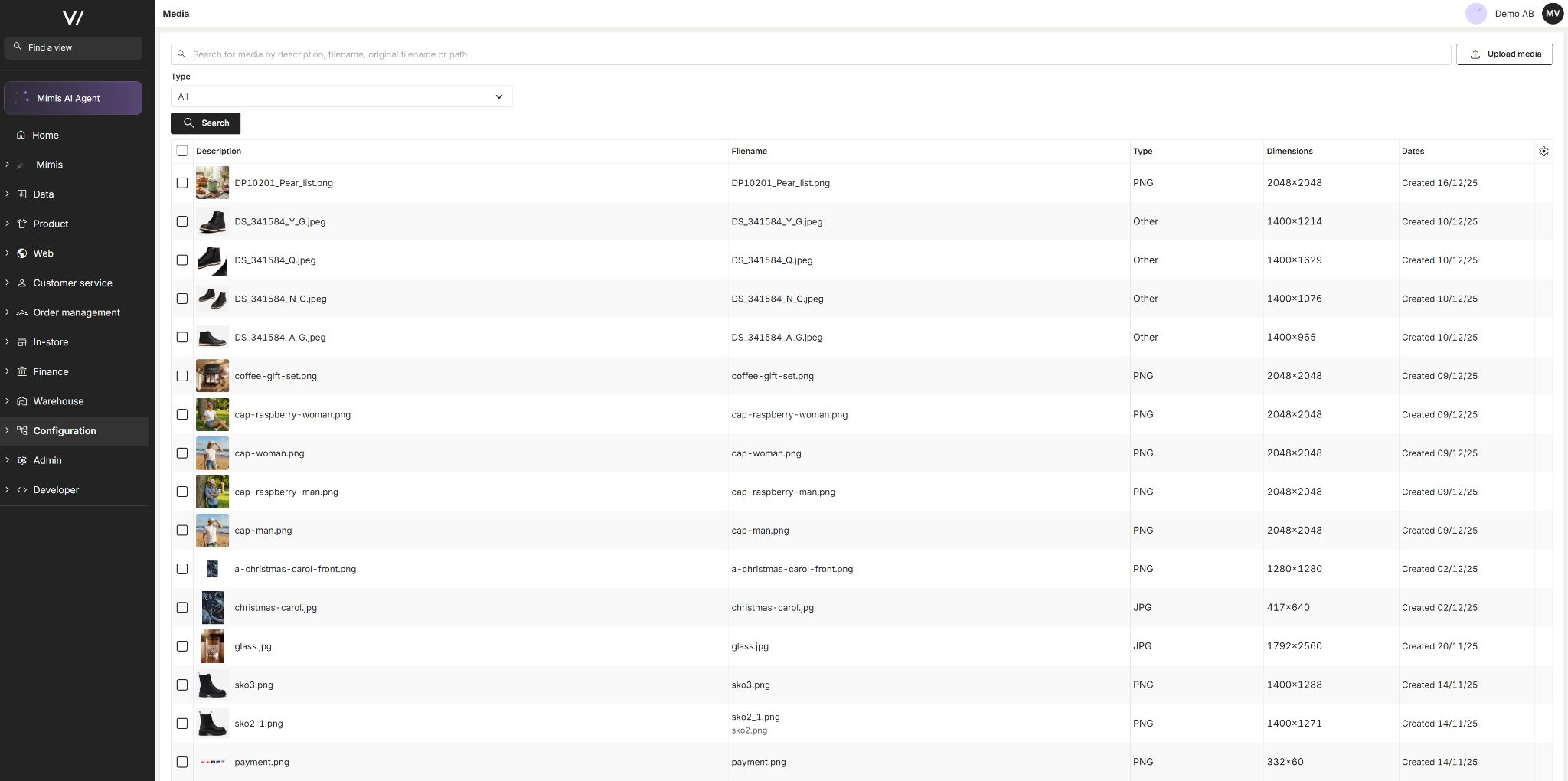
Manage the media library in Viskan Backoffice (Backoffice)
Media view has moved into the new Viskan Backoffice. In the new Media view you can search the entire media library by description, filename, original filename or path, filter by media type, and preview images and video directly in the list. Descriptions, alternate texts and per-language translations are edited in one place, and media can be deleted one at a time or several at once.
It is now also possible to generate fallback texts using Mímis once you open a specific media.
Allow copying any type of order in backoffice (Backoffice)
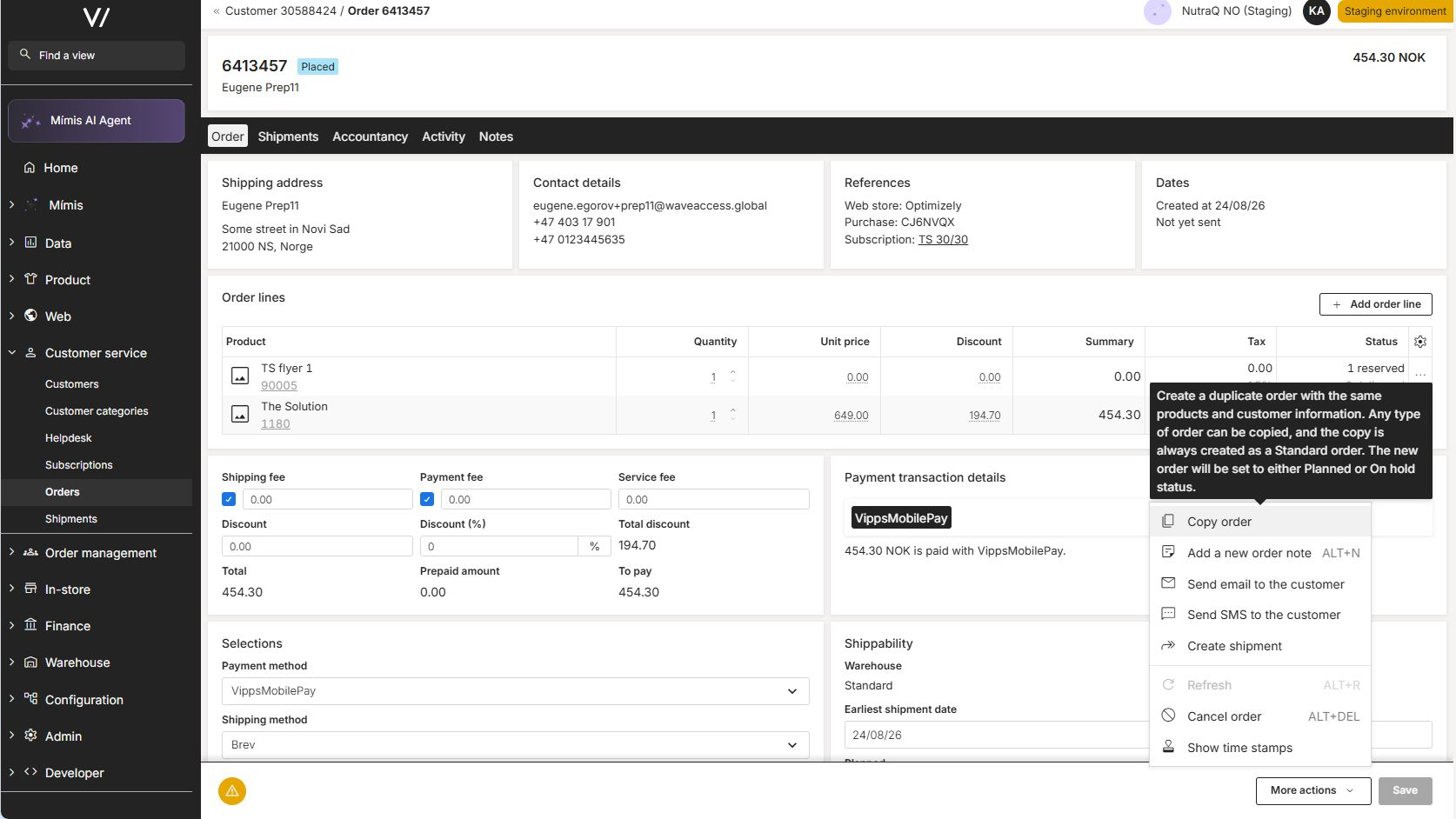
The "Copy order" action in the order editor was previously limited to standard orders. Orders of any type, such as subscription and bonus orders, can now be copied. The copy is always created as a standard order and carries no subscription or bonus references.
Walley Checkout: new integration with upsell (Integrations, CMS)
Walley Checkout now runs on Walley's current APIs. The old SOAP calls and the old authentication path are gone, and Walley works as a regular payment service provider, set up like every other provider.
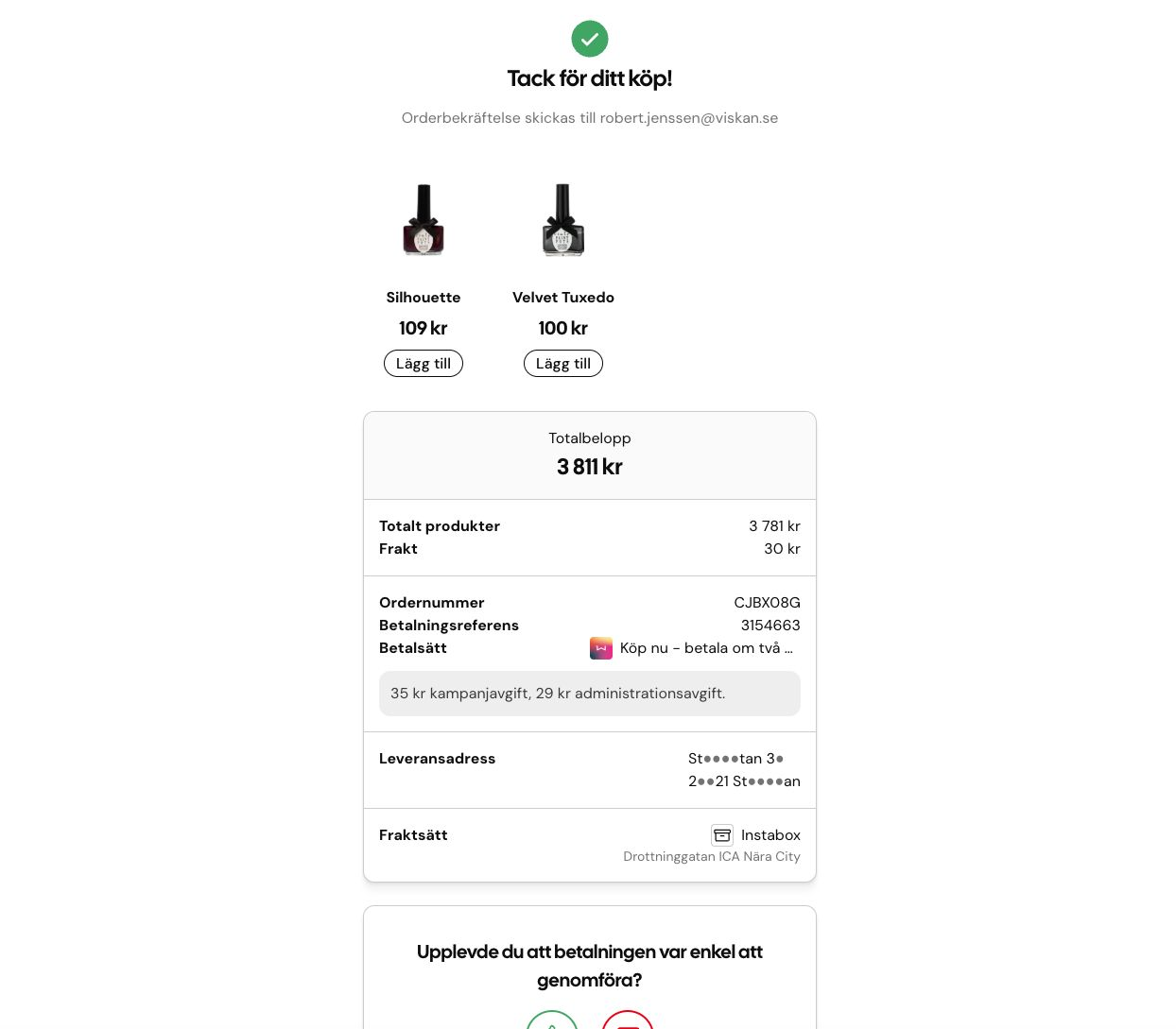
The new feature is upsell. After the purchase, Walley offers related products on the receipt page, and the customer can add them to the order they already placed. You decide what gets offered: the products come from the relations already set on your products, and you pick which relation type to use — Matching, Prepacked, Also bought, Add-on or Purchase options.
The new integration also handles subscriptions.
Both CMS versions (S3 and Next Generation) have this. Stores already on Walley will be moved over to the new integration. The old configuration stays in place for now, so a store can go back without a code release.
Show better failure reasons with vipps mobile pay (Integrations)
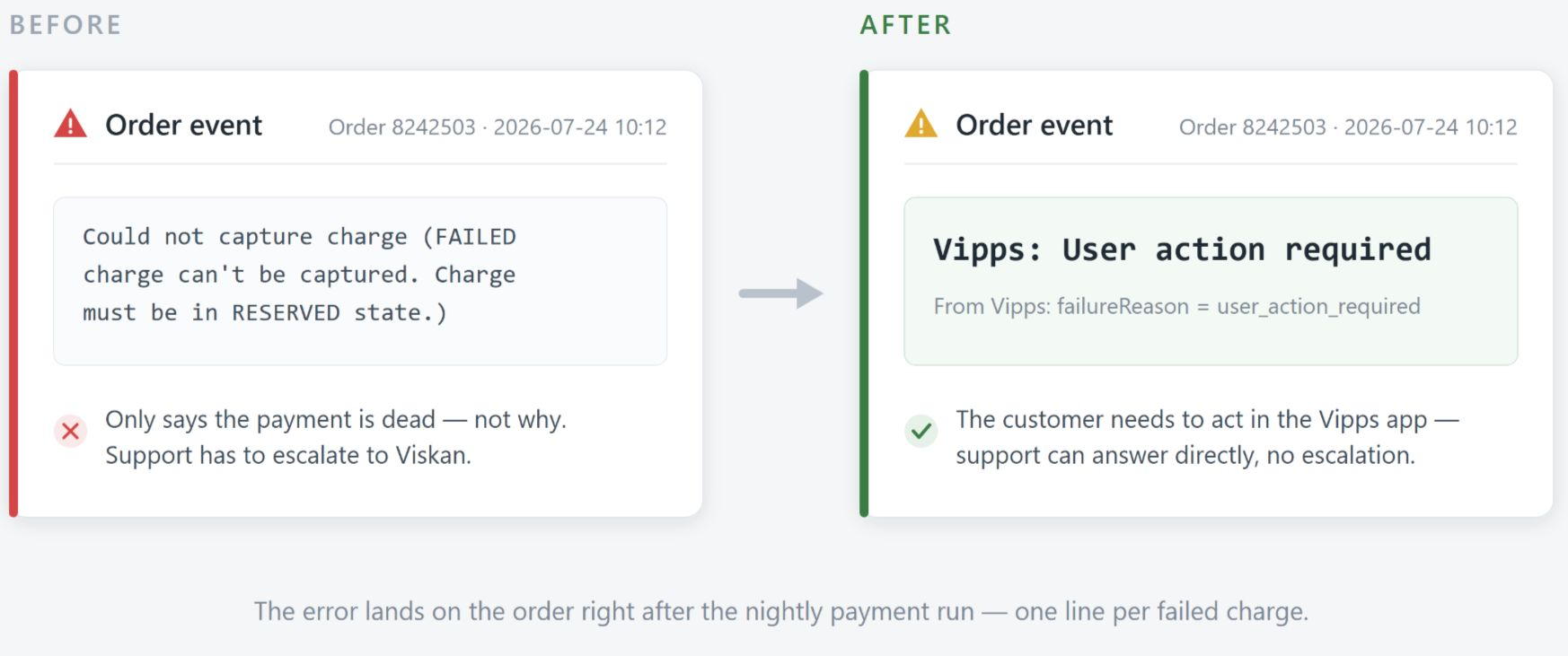
We have made some changes to ensure more clear error messages when VippsMobilepay charges fail. Instead of a generic failed message it may instead say “User action Required” which means that the end user needs to go into their Vipps application and do something, for example making sure they have enough funds.
Run stock reservation from the product editor (Backoffice)
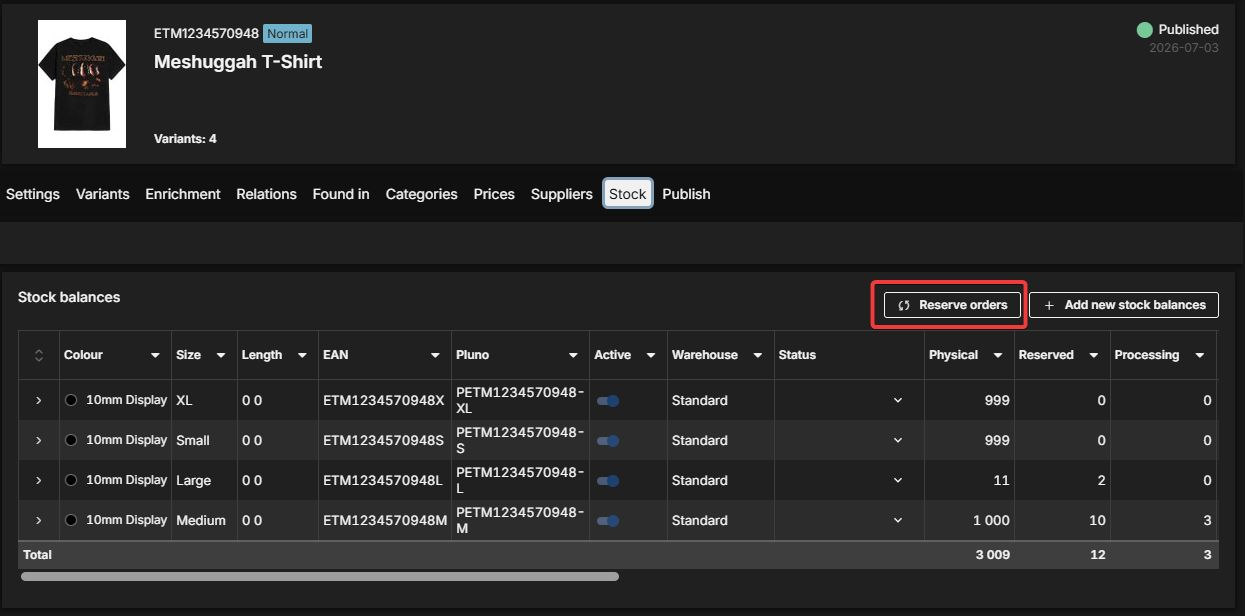
Open orders waiting for stock were not always reserved when new stock was registered, and every incident had to be fixed by Viskan support running the reservation routine manually. The product editor's stock tab now has a Reserve orders action that reserves open orders against the current stock, either for the whole product or for a single variant. Reservation also runs automatically whenever stock levels are saved, so newly registered stock reserves waiting orders straight away.
Store returns now reach Ingrid (Integrations)
Store returns registered on an online order are now created in Ingrid Returns automatically. When a return is registered in a physical store on an online order, a new Ingrid Return Service creates and approves the return in Ingrid via the Returns Partner API. Returned lines are sent on SKU level, with the quantity actually returned in store.
Only store returns belonging to an online order are handled — other store returns are ignored, the same return is never created twice in Ingrid, and failed calls are retried and logged. The store return becomes visible in Ingrid as Completed, and the customer can no longer start a second online return for the same items on My Pages.
Mímis can answer more questions (Backoffice)
The data search in Mímis now reaches considerably further into Viskan. It can tell products that are for sale apart from discontinued or not yet launched ones, and it knows colours, sizes and lengths per variant, including colour codes.
On the commercial side it now covers also:
- customers (billing city, postal code and country, first and most recent purchase, block codes)
- orders and shipments (payment method, shipping method and carrier, invoiced, paid and credited amounts, outstanding balance, due date and payment status, line totals and shipped quantities — always with the correct currency)
- subscriptions (delivery interval, previous and next shipment date, how the subscription was signed up, the seller and the cancellation reason).
Better data table in Viskan Backoffice (Backoffice)
The data table used throughout Viskan Backoffice got a round of improvements that make large tables much easier to work with. Column widths can be dragged to the size you need, filtering now applies as you type instead of requiring an apply button, and your filters and sorting stay put when you switch tabs within a view.
You can also choose which columns to show from a menu in the table header — your choice is remembered per page — and switch on a summary row that totals the numeric columns for whatever you have filtered down to.
Mímis UX and flow improvements (Backoffice)
A batch of improvements to Mímis based on real use after launch. When Mímis returns a list, the complete result is now attached as a downloadable CSV beneath the answer — previewable in a sortable, filterable table — even though only the first rows are shown in the chat.
Answers now follow user's own locale for numbers, dates and times, so separators and date formats match the rest of Viskan Backoffice. Follow-up questions work better too: Mímis remembers how it found the previous answer, so it can explain its reasoning or refine the result instead of starting over. A bare number is now read as an order or product number rather than an internal id, and installations with more than one company get a note that results cover the current company only.
On top of that: answers should hopefully no longer stop halfway, the chat no longer jumps/resizes while links stream in, and menus and selection lists are easier to read in both light and dark themes.
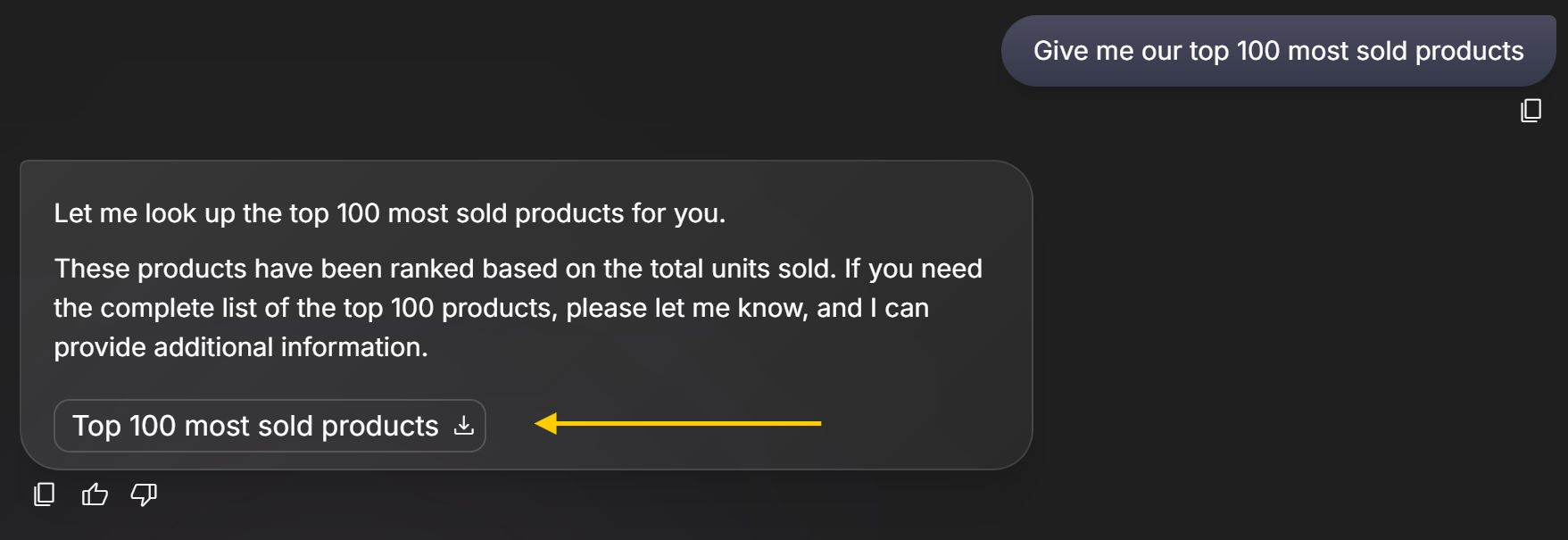
WebMCP: Next gen is ready for AI shopping agents (CMS)
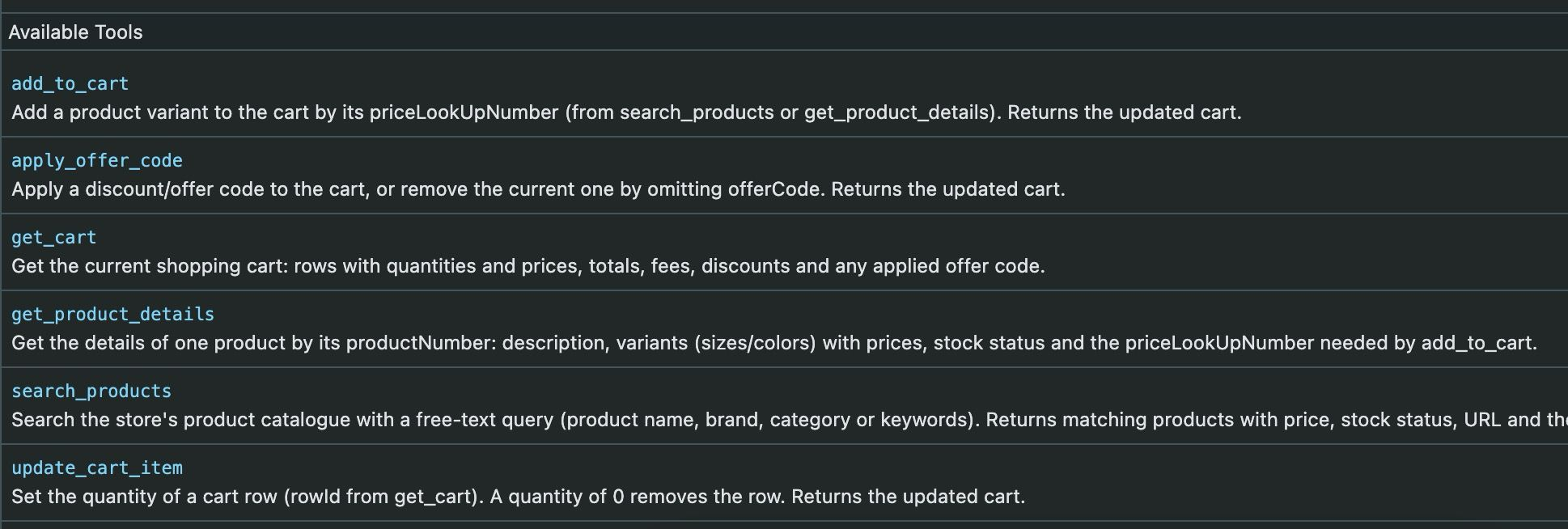
AI assistants built into browsers — Chrome's Gemini, Copilot in Edge, extensions like Claude — are starting to shop on behalf of users. Until now they had to guess their way through a storefront: scraping pages, clicking buttons, filling forms.
Viskan Next Generation now speaks their language through WebMCP, an emerging web standard from Google and Microsoft. Instead of guessing, an agent gets a clear menu of what it may do:
- Search the catalogue
- Look up a product's sizes, prices and stock
- Add to cart and adjust quantities
- Apply an offer code
Every agent action runs through the same flow as a shopper clicking in the store — the cart updates on screen, analytics fire, errors show the same way. Checkout and payment stay with the shopper; the agent hands over when it's time to pay.
WebMCP is currently in Chrome's origin trial. This positions your store ahead of agentic commerce.
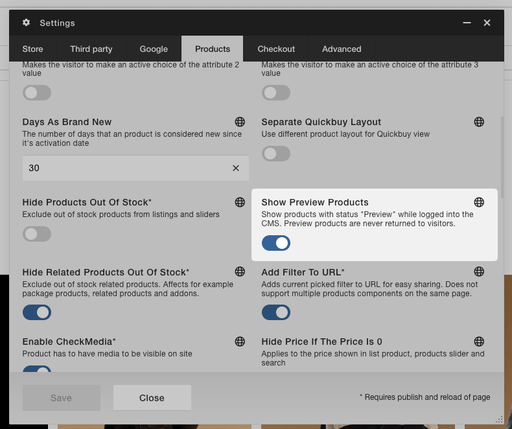
Show preview products in CMS (CMS)
We have a new product status called “Preview” that enables you to view products on the site, even if they miss data. We use fallback data instead in those cases.
You need to activate the store setting “Show Preview Products” to activate the functionality.
The products will get a special badge so you know they are preview, and they are not visible to visitors.
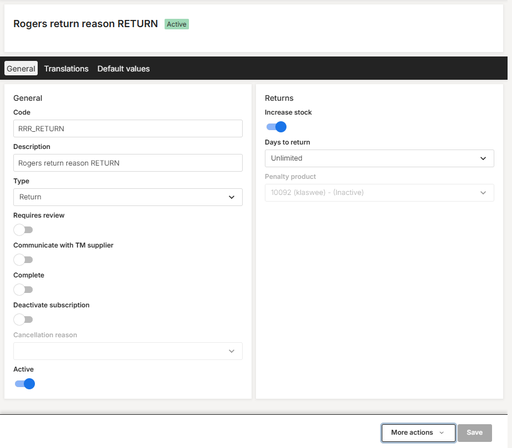
Return & Credit Reasons — now in Viskan Backoffice (Backoffice)
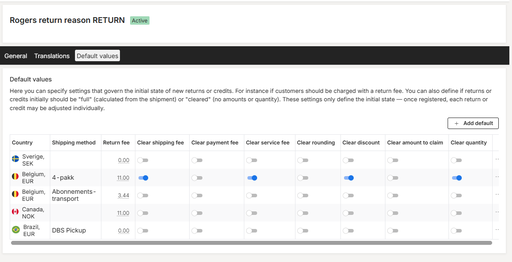
The Return & Credit Reasons editor has been ported to Viskan Backoffice. All existing capabilities are available: reason codes, types, translations, default values per country and shipping method, and in-store arrival method mappings.
Administrators can now configure the reasons customers use when making returns or requesting credits. Each reason has a code, description, and type — return, complaint, credit, or uncollected parcel. You can define default values per country and shipping method, such as whether a return fee applies or if the shipment amount should be cleared automatically.
Translations support multiple languages, and reasons can be activated or deactivated without losing historical data. A new arrival method section ties reasons to in-store return flows, making the full return experience configurable from one place. (The in-store tab is shown when in-store returns are enabled for the tenant.)
Maventa eInvoicing: Attach a pregenerated (third-party) invoice PDF (Integrations)
This feature supports Maventa (eInvoices) attaching a pregenerated PDF — for example an invoice produced by a third-party system — fetched from a URL in a shipment custom field, instead of always using the Viskan-generated report. A configurable fallback is used when the PDF can’t be used.
Checkout override (Integrations, CMS)
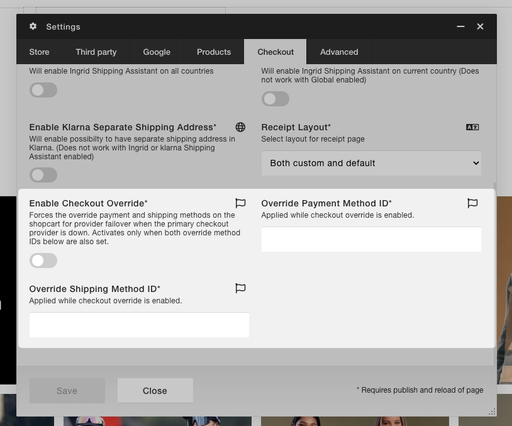
This new feature allows you to override the default PSP. It’s useful in scenarios where your default payment provider experiences downtime — with a simple toggle in the CMS you can quickly direct all users to a backup PSP.
To use this, you need an active agreement with the PSP that will serve as the backup.
Users will also be limited to one shipping method, which you define in the settings.
Wishlist (Next Gen) (CMS)
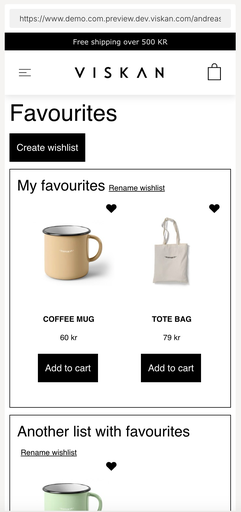
Customers can now save products to wishlists and come back to them later. A new toggle (for example a heart icon) lets them add or remove a product anywhere it appears, such as on product pages and in listings.
Customers can keep several named lists, rename or delete them, and move products between lists to stay organized.
Wishlists also work without logging in, since items are saved in the visitor’s browser. When they sign in, those saved items are automatically merged into their account, so nothing is lost.
The wishlist UI is built from new CMS components (toggle, list view, and list actions), so you can place and style it wherever it fits your store.
This functionality is only available in Viskan Next Generation CMS.
Ingrid Returns (Integrations, CMS)
- Customers can now start a return on their own, straight from the “My Orders” page — no need to contact support. The return form already knows their order and email, so it’s just a few clicks.
- You can show the return option right on the page, or hide it inside a tidy “click to open” section so the page stays clean.
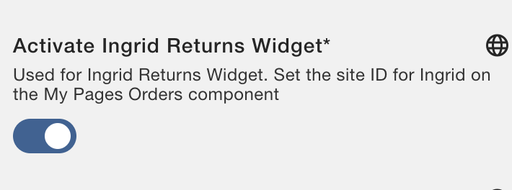
- Easy to turn on — just flip a switch in the store settings/third party and paste in your Ingrid ID. No developer needed, and you can adjust the look to match your shop.
Improved tax distribution for invoices & credit/returns (Backoffice)
VAT on shipping, payment and service fees and order discounts is now spread across the order’s tax rates by net value excl. VAT, after row discounts — as tax authorities require (previously: incl. VAT, before discounts).
Credits mirror the invoice exactly — the split is stored at invoicing and reused, so even a partial return on a mixed-rate order credits fee VAT at the right rates.
Return fees are booked flat at the country’s standard VAT rate — a new country setting, pre-populated for ~30 markets, with an admin data check that flags missing setup.
Capture launch interest with the Planned product status (CMS)
The "Planned" product status lets shoppers sign up for an email notification when a coming soon product becomes available, even if the product is already in stock. Upcoming products can be highlighted with a coming soon badge, dedicated buy-button text and the publish date and time across product cards and the back-in-stock form.
Open any product with a single click from across Viskan Backoffice (Backoffice)
Product references throughout Viskan Backoffice are now clickable links that take you straight to the product in PIM. No more copying a SKU and searching for it manually — just click the product where you already see it.
Import videos directly in the new PIM product editor (Backoffice)
The new PIM product editor in Viskan now supports importing video. You can now upload videos alongside images from the product's media (enrichment) tab, so all product media can be managed in one place in the new PIM. This removes one of the remaining reasons to fall back to the old editors.
Cancel a running search instead of waiting for it to finish (Backoffice)
You can now cancel an ongoing search in Viskan Backoffice instead of having to wait for a slow one to complete before refining your filters. Start typing new criteria or press Enter and the previous search is aborted and re-run with your new input.
Cancelling also signals the server to stop the underlying database query, so abandoned searches no longer keep loading the database in the background. The same applies to the api-first version, where the search request is aborted as well.
Create and manage properties through new Property API (API)
The new Property microservice can now create and manage property keys end to end — not just read them. You can add new keys for products, variants and customers, manage their predefined values, and maintain translations per language, all through the API.
Support was added for the new STRING and STRINGS property types, and for assigning key/values across all three entity types. To keep data consistent, duplicate predefined values are now prevented both in the API and in Viskan Backoffice.
Creating property keys the old way (file communication / legacy API) is now blocked unless the new "allowLegacyPropertyKeyCreation" setting is enabled, steering integrations toward the new flow. When a key is missing, the error now clearly states it must be created via the Property API or in Viskan Backoffice.
Improve listing of returns and credits in the Shipment view (Backoffice)
The Shipment view now shows both credits and returns with reason description and status.
Brand name in Related products (CMS)
You can now display the brand name on each product in the Related component. Enable it with the new Show brand name toggle under Product settings in the component's settings.
Manage job exceptions directly in Viskan Backoffice (Backoffice)
A new "Job exceptions" editor is now available under the Admin menu in Viskan Backoffice. It lets you define date ranges when an ETMScheduler job should not run — for example, skip reminder SMS on national holidays, or don't create invoice batches during the inventory period.
Previously these exceptions could only be added directly in SQL, which was error-prone and required Viskan's help. Now they can be created and maintained through a normal view, with access controlled by permissions.
Activate, deactivate and run jobs from Viskan Backoffice (Backoffice)
The Job overview has been migrated to Viskan Backoffice, replacing the older wETM editor. From it, permitted users can see their ETMScheduler jobs and activate, deactivate or manually trigger a job.
The migration also fixed two long-standing issues from the old editor: users can now only activate or deactivate a job when the corresponding permission is enabled, and the list only shows jobs that users are actually allowed to activate or execute — no more irrelevant sub-steps cluttering the view.
Activating or deactivating a job now updates the schedule immediately rather than waiting for a sync.
Job history view in Viskan Backoffice (Backoffice)
The Job history view has been migrated to Viskan Backoffice, replacing the old wETM editor. It gives a clear overview of past ETMScheduler job runs and what happened with each of them.
You can filter the history by job, by completion status and by acknowledge status, open the messages tied to a specific run to see why it succeeded or failed, and acknowledge a failed job once it's been dealt with. This enables monitoring and following up on scheduled jobs directly from Viskan Backoffice.
Add automatic credit note creation for returns and small amount credits (Backoffice)
A new country setting enables automatic credit note creation when reporting returns or credits in shipments, and when crediting small amounts. No rounding is applied to the auto-created credit notes, and a customer activity is generated for each credit note.
Sort and organise products within a product category (Backoffice)
A new product web categories view is now available from the Web menu in Viskan Backoffice. It shows the product category tree for a chosen web store, with filtering by category name and by active/inactive, so it's easy to find the right category to work in.
Within a category you can now arrange products in exactly the order you want — on product and product/colour level — and group products so chosen ones always appear first or last in the listing. You can also select one, several or all products and copy them to other categories, giving merchandisers full control over how a category is presented without needing developer help.
Note: This feature is not yet available for all customers. Contact us if you're interested.
Improved content editing and user experience (Backoffice)
We have improved UX around properties.
Here are the key highlights:
- Rich Text Support: You can now use HTML formatting for single-select and multi-select predefined values.
- Better Descriptions: We have rewritten the descriptions for different property types. They now focus on how the information is used in the final product, rather than the technical setup.
These changes make the system more intuitive. By focusing on the purpose of each field instead of the property itself, we help everyone work more efficiently and improve the quality of our data.
Major improvements to customer search functionality (Backoffice)
We have rolled out a significant update to our customer search to improve usability.
Key Improvements:
- New specific search fields: Specific fields for name, address, email and phone
- Multi-Keyword Support: Usage tooltip for fields with multiple search terms (e.g., "Anton Borås")
- Flexible Data Entry: The new specific search fields are now more flexible and wildcarded on start and end
- Better search results: The different hits are ranked differently to make the most relevant hits show higher up
- Improved Logic for Duplicates: Searching by customer information now ensures the correct, most relevant record is shown, even if newer duplicates exists.
API for retrieving accountancy journal data (API)
Makes customer accounting journal data available to external systems through a simple, secure web API.
- GET /accountancy/journal/journals
- Journals grouped by accounting period, with all the details: accounts, amounts, VAT, currency, and country.
- Filter by date or period. Capped at 24 months per request to keep things fast.
Efficiency update Viskan Backoffice (Backoffice)
Fewer clicks, better overview, faster support
1. Smarter Search & Navigation
- One-Click Access: Open Customers, Orders, or Subscriptions directly from any search result. No more clicking opening the objects first and then accessing references through different tabs.
- Unified Search: Search for names, addresses, phone numbers, or orders in one single field. And include customer and subscription references on Customers, Orders, Subscriptions and Shipments.
- Helpful Guidance: New tooltips and specific filters (email, phone, etc.) make it easier for everyone to find the right data.
2. Instant Status Visibility
- New Status Badges: Spot orders or subscriptions that are "On Hold" or "Awaiting Approval" directly in the list.
- Improved Context: Customer details are now visible in global order searches, so you always know who you are looking at.
This reduces navigation time, helps provide more information without having to open search results and makes the overall experience more intuitive.
Update of card/recurring details on MyPages (Nets) (Integrations, CMS)
You can now easily update your card details for an existing saved card linked to a specific subscription. After logging in to your account page, go to your subscriptions, select the one you want to manage, and edit the payment method connected to it. This allows you to change card information such as expiration date, card number without needing to create a new subscription.
This feature is available for purchases made using Nets.
Maventa - check if customer can receive eInvoices (Integrations)
Bank account details used for e-invoice processing through Maventa can now be configured independently from those used on printed PDF invoices. This enables e-invoice support for countries such as Norway, where IBAN/BIC is not the standard bank account format for customer payments. A new eInvoice flag on IBAN-type bank accounts distinguishes records intended for electronic invoice processing from those used for PDF output.
We also restricted the customer account check at out in the shipment creation routine to Finland only, so other countries can use e-invoices without requiring a customer account record.
Subscription improvements - every nth (Backoffice)
- We’ve updated validation rules to require at least one product per priority level for every nth products. Consequently, Every Nth products now have a fixed N/A priority with editing disabled matching "Send only with X" behavior to reduce configuration complexity and prevent delivery errors by ensuring reward items always ship perfectly bundled with their primary products.
- We have introduced a new UI for the subscription template editor that allows users to add extra product plans (every nth products and send only with delivery X products) while minimizing complexity.
Native integration for Vipps (Integrations)
- Native integration enables recurring Vipps/MobilePay transactions.
- It is currently only available via the raw purchase flow.
- Authorization is supported in Sweden, Norway, Finland, and Denmark.
- Full and partial captures of authorized amounts are allowed.
- Cancellations and outpayments, including partial refunds, are fully supported.
Minor API changes/improvements (API)
- Warehouse management API: incoming balance and incoming date added (GET, PATCH)
- Stock balances
- Order management API: web store and method of arrival added (GET)
- Orders
- Shipments
- Returns
- Order management API: batch number added (GET)
- Shipments
- Order management API: customer’s balance added (GET)
- Shipments
- Order management API: performance improved (GET)
- Orders
Minor backoffice changes/improvements (Backoffice)
- PIM: Warning if price = 0
- Subscriptions: Cancel any non delivered subscription order when saving changes
- Subscription templates: Support for translations added
- Cancellation reasons: Support for translations added
- Arrival methods: Support for translations added
- Orders: Show physical and web stores
- Subscriptions/Orders/Shipments: Show block code
- Subscriptions: Improved support for gifts
- Shipments: Improved layout and validations
Migrate warehouse editor (Backoffice, API)
The Warehouse Editor has been migrated to the new backoffice, allowing users to create, edit, copy, and search for warehouses. All existing warehouse capabilities are preserved in the new editor in addition to easily see all stock locations for a warehouse in a separate tab.
Since the editor is fully-api first this means we also get new Warehouse API for managing warehouses, including address, contact info, settings, and stock locations
Svea: Support returns and subscriptions (Integrations)
- Svea integration now supports deliveries, cancellations, returns, subscriptions and Streamline Express.
- There are some limitations on partial operations such as partial delivery.
- Supports, card, swish, invoice payment among others.
Mímis: Support for a few campaign connected questions (Backoffice)
Mímis is now able to access campaign data, allowing users to extract and analyze campaign performance metrics directly from the chat. The current version supports extraction of the following campaign data:
- Campaign Name
- Campaign type (Marketing campaign or Offer campaign)
- Offer type (Only applicable for Offer campaigns)
- Whether the campaign is active
- Related orders and order lines
- Related subscriptions
Some example questions are:
- Which of my active campaigns has performed the best so far?
- How did campaign X impact total sales?
- List the number of orders per campaign in November.
- And more….
Extend Quote form with specific questions (CMS)
The quote request form now has support for displaying product related questions. Since these can vary per product, the data is added to product properties. The product questions can be displayed as text fields, dropdowns, radio buttons or checkboxes based on the property description. For dropdowns, radio buttons and checkboxes each option is added as a separate property key value. All product fields are required, meaning that for a checkbox group, you need to check at least one to be able to proceed.
There is an option to enable a two-part form with product questions in the first part of the form and contact information in the second to avoid the form becoming too long.
Support for prices and discounts excluding tax (Backoffice)
- Users can now view and modify prices excluding VAT within the Subscriptions, Orders, and Shipments views of Viskan Backoffice
- This feature can be toggled on or off via Admin > Settings > "Also show prices excluding tax"
Group Colors for Hello Retail Pages (CMS, Integrations)
It’s now possible to group colours in filters when Hello Retail.
It’s Controlled by the aggregateAttribute1Group Store setting in the CMS and it requires additional set up in Hello Retail. (ask your customer manager for more info)
For example Burgundy, Dark Red, red are in group Red.
Previously each colour would show up as a filter, which would dilute the filter options.
Now instead there is only one Red filter option that handles all the red colour options.
Unmask personal data on receipt page at purchase (Security)
The initial mitigation in checkout involved masking all personal data in receipt data sent from the backend. While this prevented personal data from being sent to third parties via Google Tag Manager, it also reduced the effectiveness and relevance of marketing campaigns in Google Ads and other platforms due to the lack of unmasked data matches.
This issue has now been resolved. The backend now only sends unmasked personal data to the receipt page during an actual purchase. If the receipt page is reloaded, or if an old receipt URL is used, the personal data is immediately masked. This ensures third parties receive relevant purchase data at the time of purchase, without making personal data available otherwise.
This solution is GDPR compliant and maintains relevance for third-party marketing.
PIM: Added more search options (Backoffice)
It is now possible to find products using more filters in Viskan’s new PIM. This helps replacing some other overview views (such as Product Overview Legacy) from the older generations since you can now find products missing stock, translations, specific properties and so on.
PIM: Added “found in” tab (Backoffice)
It is now possible to see where a product is being used/referenced. This includes:
- Package products
- Subscription templates
- Campaigns
Added copy period support (CMS)
We have now added the support for copying periods in the CMS (S3)
Streamlining campaigns for regional flexibility and VAT compliance (Backoffice, API)
Improved the support for campaigns (not including offer campaigns!) not to need to specify a country. We now have improved support for dealing with non-specified countries on regular campaigns inside of raw purchase API and streamline express were as previously only regular purchase flow was supported.
This means that the merchant does not need to do country-specific work for handling campaigns.
(will be out in prod in mid feb)
Mímis: Support for credits and returns (Backoffice)
Mímis now has the capability to address inquiries concerning customer returns and credits, including:
- How many returns were processed in November 2025?
- What was the total monetary value of credits issued in November 2025?
- Which three products saw the highest return volume throughout 2025?
(will be out in prod in mid feb)
Add pinch zoom for product images on mobile (CMS)
Added pinch zoom functionality for product images on mobile devices in the Viskan eCom engine. This enhancement allows users to zoom in and out of product images using touch gestures, improving the overall user experience when viewing product details on smaller screens.
(will be done in sprint 6)
Traffic light based on stock balance (Stock Indicator) (CMS)
The new Stock Indicator component let’s you specify a limit and depending on if the stock is over or under the limit different colors and texts and shown.
It’s supported on PDP as a separate component (Stock Indicator) and Products and Product Slider components as a setting.
You can also control the limit via a property key to be able to have unique limits per product or SKU.
CO-pack added to Maventa integration (Integrations)
The Maventa integration now correctly handles co-packed deliveries.
Now we send one invoice per bundled shipment. Previously these invoices were all sent separately (more than one invoice per shipment)!
Giftcard balance shall cover shipping costs (Integrations, CMS)
Previously when using Kustom/Klarna Shipping Assistant (KSA), it was not possible to use a gift card to cover the shipping cost. This has been changed - from now on when using KSA, the shipping cost can be covered by a gift card.
Support for filtering by postal code in Customer API (API)
Extended support for filtering in the customer GET endpoint in the Customer API with zipcode / postal code and countrycode
Accessibility - Buy button should be usable with a keyboard (CMS)
- You can now focus and click the buy button using only a keyboard
- You can now see the focus indicator of the currently focused element
Support for badges on variant level (CMS)
- This concerns badges coming from property keys
- Activate in CMS settings
Support for Diggecard for B2B (Integrations)
We have optimized the purchase process for B2B accounts buying Diggecard gift cards.
The system now automatically adjusts company name data to meet Diggecard’s specific requirements, ensuring immediate and seamless delivery for all B2B Diggicard purchases.
Viskan Advanced Price Model - B2B (Backoffice)
We have made a new tool to manage complicated pricing for business customers, where each customer has different prices. This tool need some more work if other B2B customers want to use it, but it could be helpful in the future if we face a situation with a huge number of different prices.
Note: This is not a replacement of the current way we handle prices but an extension of it.
Support for more warehouse settings (Backoffice)
It is now possible to modify the “Stock location” and “Allow purchasing” settings for warehouses in the Warehouse view. Some texts have also been modified to improve user experience.
Avarda checkout (Integrations, CMS)
We are pleased to announce that we have now implemented support for Avarda's checkout!
With Avarda’s checkout, we can offer an even smoother and more user-friendly payment experience. A major advantage of Avarda's checkout is White Label - meaning customers can maintain their own brand's look and feel throughout the entire payment process. This means that customers receive a consistent experience from the moment they enter the website until the purchase is completed, which can strengthen brand loyalty and enhance the overall customer experience.
Please note: There is currently no backend support, meaning order management functionality like activations, returns, cancellations etc are not supported.
Customer properties support (Backoffice)
- We have added support for adding customer properties in the backoffice
- We have added a properties tab in the customer service editor where one can connect properties to a customer
- We have added support for showing a badge (linked image for the value of the customer property connected to the customer) in the customer service editor
- We have added API support for connecting a property to a customer
- We have added the support for being able to control if we should be able to edit the property values through the UI or through API only
Helpdesk API (API)
We have added the helpdesk API in Viskan Open API.
This API allows our customers to get and edit helpdesk tickets if they for example want to edit labels.
New condition on Offer 1 “Now X SEK” (Backoffice)
Added a new condition on offertype 1 “Now X Sek”:
If “Apply discount to expensive products first” is selected then expensive products will be selected first for the offer price. If not set the cheapest products will get the new price first.
Example: Now 200 Sek
I buy a shirt that costs 300 and one that costs 500.
With the new option set I will pay 300 + 200 = 500
If its not set i will pay 200 + 500 = 700
Add support for badges on variant level (CMS)
It’s now possible to show different badges on
different variants
ModelUp 3D integration (Integrations)
The Modelup component integrates a powerful 3D product configurator into Viskan CMS. This interactive component allows customers to customize products in real-time using Modelup's 3D visualization technology, embedded within an iframe interface.
Key features include:
- Real-time price calculation
- Seamless cart integration
- Responsive overlay interface
- State persistence
- Error handling
Each part in the configurator will be added to the shopcart as its own product. So one 3D configuration can be for example 20 products.
Offer form (CMS)
Quote request form component to Viskan CMS
The new component makes it possible to display a quote request form for products that are only available upon request. Define which products are quote-only by setting a property key in the store settings. Products that do not have the property will display the regular buy button and be added to cart as usual.
Support for update integrites in MyPages and customer registration (CMS)
You can now add possibility to update more specific consent preferences in my pages in Viskan eCom engine
Notification option for when product is sold out in checkout (CMS)
We've introduced a new "Notify me when back in stock" feature that appears directly on individual shopping cart rows when products become unavailable. This targeted approach lets customers stay informed about specific out-of-stock items without losing their purchase intent.
- The notification field only appears on cart rows for products that are currently out of stock
- Customers can enter their email address for each specific product they want to track
- Granular control means customers choose exactly which products to monitor, not their entire cart
Add visibility condition on container for product attribute (CMS)
We've added a new visibility condition to the Container component called Product Variant Property that lets you access individual variant properties. This allows you to dynamically show or hide content based on the specific properties of the selected variant.
Use case example: Display a unique washing instruction label only when customers select a particular color variant that requires special care.
Simple bundle product display (CMS)
Enable grouping of duplicate add-on products and display their combined quantity on the product detail page and shopcart in Viskan CMS.
Comparison slider (CMS)
Add comparison slider to Viskan CMS media and thumbnail components
You can enable the comparison slider in Viskan CMS on media and thumbnail components. A comparison image can be added as a media with a media_row that starts with 8. media_row 8010 will be compared to 1010, and 8100 will be compared to 1100 etc.
Slideout confirmation (CMS)
We've added a new shopcart field called "Show last added item" that enables you to display the most recently added product anywhere within the CMS.
How it works:
- The field automatically tracks and displays the customer's most recent cart addition
- Compatible with all shopcart row locations - slideouts, pop ups, sidebars, or any CMS placement
- Updates dynamically as customers continue shopping
Use case example:
Create an engaging popup that appears after a customer adds a product, displaying the item alongside promotional text like "Great choice! Complete your look with these matching accessories" or "You're one step closer to free shipping - add $25 more!"
Business impact:
This feature enables sophisticated cross-selling opportunities, reinforces purchase decisions, and creates personalized shopping experiences. You can guide customers toward complementary products or encourage them to reach free shipping thresholds by leveraging their most recent product interest.
Copy Order (Backoffice)
Fully implemented the option to copy normal orders in new Viskan Backoffice
Move structured data markup to server-side (Platform)
We've moved all structured data markup generation from client-side to server-side processing. This architectural improvement delivers better performance and SEO outcomes.
- Faster page loading - Structured data is now rendered immediately with the page, eliminating JavaScript processing delays
- Enhanced SEO performance - Search engines can instantly access your product information, reviews, and pricing data without waiting for client-side scripts to execute
- Improved reliability - Server-side generation ensures structured data is always present, even if JavaScript fails to load or is disabled
- Better Core Web Vitals - Reduced client-side processing contributes to improved page speed metrics that Google uses for search rankings
Added more supplier related data to Viskan API (API)
Added supplier number:
- Supplier search (GET /warehouse-management/supplier/suppliers)
- Inorder search (GET /order-management/return/returns)
- Article search (GET /warehouse-management/purchase-order/purchase-orders)
- Article save (POST /product-information/product/products)
Added support for Unit Price Excluding Tax and Status to:
- Inorder search (GET /order-management/return/returns)
New base property editor for products and variants
We have a new editor for adding and changing property keys and their predefined property values for product and variant properties. Also it’s possible to search and group/sort property keys.
Improved UX in tables
We have improved the new Backoffice's table UX by removing the input field borders which caused visual clutter. It is now much easier to see and read the content in the tables. Note that “editable cells” are marked with a dotted underline to indicate that they are editable.
Custom Fields for Shipments and Returns
It is now possible to use Custom Fields for Shipments and Returns.
Administrators can add new fields in Viskan Backoffice.
Automatically updated pricelist based on subscription status
Now it is possible to update the pricelist specified on a customer automatically based on the status (active / inactive) of a customers current subscriptions.
Example: If a customer has an active subscription we want them to have better prices for other orders, so we can configure this functionality to give them a pricelist with better prices. If they cancel all their subscriptions they will automatically go back to the default pricelist and thereby get the default prices again.
Interested? Ask your CM for configuration.
Filtering by subscription start date in the Subscription Mass Update editor
Users can now filter subscriptions by start date in the Subscription Mass Update editor.
Contact person and email on b2b orders
When placing an order for a company, the user’s (instead of the company’s) name and email address will automatically be set on the order. This will make it easier to see who within the company that placed an order.
Automated invoice PDF creation
A new Viskan Automation enables PDF:s to be automatically created when creating shipments.
This can be specified in the old backoffice’s shipment batch settings.
New estore Product API
We have developed a new product API with:
- new design for product list/search/detail & feed
Possibility to add external hooks & Initial support for Hello Retail as an external product provider
New feed supports delta-fetching
Sold out information in the shopping cart
Support added to show which products are sold out directly in the shopping cart and during checkout.
Customers often add products throughout the day and return later to complete their purchase, which can lead to some products becoming unavailable.
With this update, sold-out products are now clearly displayed, giving customers a better overview and helping them stay informed.
Added scrset for all images
Support has been added for the "srcset" attribute on all images. This allows browsers to load the most appropriate image size based on the device's resolution, reducing data usage and improving page speed.
Improved monitoring for all payment methods
A new feature allows the grouping of "Unexpectedly few orders" warning emails by payment method. This makes it easier to identify issues related to a specific payment method.
Support for multi-address customers
We have added support for multiple addresses per customer in the CRM API. These addresses can be of different types (invoice/delivery) etc.
This can for example be used in B2B solutions where a company/user has multiple different addresses for delivery.
With this update you now have more options to view and edit company shipping addresses for B2B customers in Viskan Backoffice.
Support for gift cards in Walley
We have added support for buying and using gift cards with Walley. Some setup is required for this to work, first you need some assistance from Walley’s side to setup a profile that supports auto-activated invoices. After settings are done in Walley, the new profile needs to be added to Viskan in the service provider configuration for Walley.
Interested? Ask your customer manager for more information.
Support for bonus orders in the new backoffice
Bonus orders feature has now been added to the new backoffice! See all your orders, including those paid with bonus points, in the new Viskan backoffice, just like regular and subscription orders.
Bonus orders and their shipments with club information references are now included in the Viskan backoffice order view in UI, bringing feature parity with existing order types (regular and subscription).
Service fee, shipping method & pickup location support in Walley
We have added support for using service fee as a row in Walley.
We also now handle the chosen shipping method & pickup location in the Walley widget if the shipping provider is Ingrid, enabling the chosen shipping method being displayed on the order.
Visualizing errors in GUI
We have improved the way errors are displayed in the new backoffice GUI. With this update, you can now see the exact values that are causing the issues. This helps the user to easier find the problematic values and correct them by highlighting the corresponding cell and showing a tooltip when hovered.
CMS component for Voyado unique personal offers
We have created a CMS component to manage Voyado's personal offers in Mypages:
- Add new my-pages component to show personal offers from Voyado
- Customer is shown personaal offers to choose from with “apply” buttons to activate the chosen offer
- (Voyado offer code must match a Viskan campaign code)
Checkout pickup location selection improved
We have improved the pickup location selection in checkout by adding a search functionality in the shipping selector that allows filtering pickup locations by postal code or city name. Instead of scrolling through a lengthy list, customer can now simply enter their postal code or city name to quickly locate nearby pickup locations.
This enhancement makes checkout smoother and faster, especially in larger cities like Stockholm and Helsinki.
Improved sending purchase events to GTM
Now it is possible to send even more detailed order data to Google Tag Manager when a purchase is made, by simply switching on one or more settings in the CMS. This is often used to send end customers’ email addresses to Google Ads for better results in marketing campaigns.
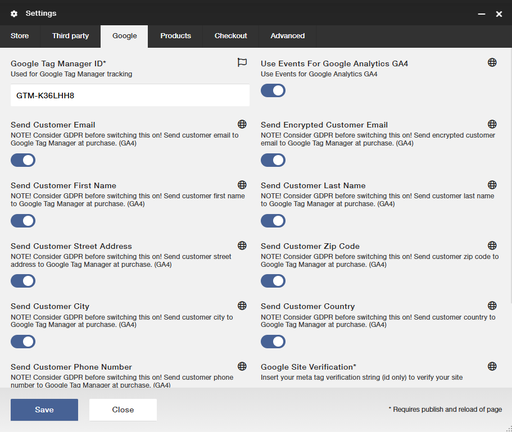
All these settings work independently from each other for better possibility to choose data to send.
Also improved:
- Possibility to set tracking for GA4 ON as default, and GAUA OFF.
- Moved all Google setting to their own tab.
A CMS bump in required to enable these settings.
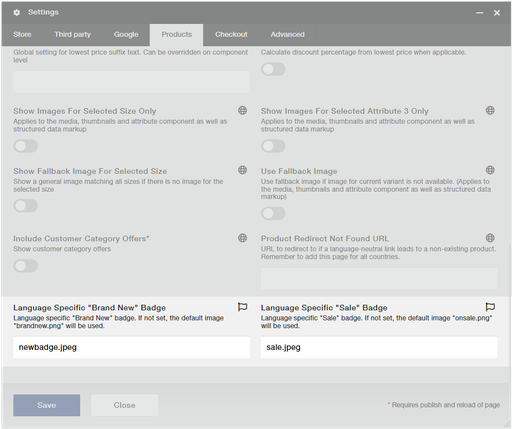
Support unique ‘sale’ and ‘new’ badges per site
Store owners can now customize "Sale" and "Brand New" badges for each language version of their site, allowing them to match badges with their site's design and color scheme across different regions. This new setting provides greater control over the visual presentation of product promotions in multi-language stores.
Where it applies: Product and category pages
Why it matters: Improves visual consistency with your brand's regional design themes while maintaining clear product status indicators for each market.
Where it applies
Product and category pages.
Why it matters
Improves visual consistency with your brand's regional design themes while maintaining clear product status indicators for each market.
Change Log: Updates to Terms in Backoffice
As part of our efforts to improve clarity in Viskan Backoffice, we are reviewing and updating terms related to deliveries and shipments. The purpose of these changes is to ensure we use industry-standard terminology and to minimize confusion.
The following changes will be made:
- The term "Shipment" will be used for all outgoing parcels. This change reflects the process of sending goods to the customer.
- The term "Delivery" will now only relate to the process of receiving goods, in line with purchase orders and incoming deliveries.
Specific changes:
- "Delivery" changes to "Shipment"
- "Delivery fee" changes to "Shipping fee"
- "Delivery method" changes to "Shipping method"
- "Invoice address" changes to "Billing address"
- "Delivery address" changes to "Shipping address"
- "Delivery point" changes to "Pickup location"
- "Terms of delivery" changes to "Shipping terms"
- "Terms of payment" changes to "Payment terms"
Clarity:
- Outgoing deliveries will be referred to as "Shipment" or "Shipping" to ensure consistent language and to provide more clarity regarding the service involved.
- "Invoice address" is simplified to "Billing address" to eliminate outdated references.
Scope:
- These changes will only be implemented in the new backoffice system and will have no impact on the API or earlier versions of backoffice.
- We will collect feedback on these changes to make any necessary updates to other areas of the system such as the API.
- This update will reach production with the upgrade of week 6 (version 25.5).
Why this change?
The distinction between “Delivery” and “Shipment” aligns with general industry standards.
- Shipping: The process of sending goods
- Delivery: The process of receiving goods
By standardizing our terms, we ensure a more intuitive experience, making it easier for you to find and identify the services needed.
We hope these changes enhance your experience with Viskan Backoffice and appreciate your understanding as we strive to deliver greater clarity and service. If you have any feedback or further questions, please feel free to contact our support team.
Updates to Viskan Terms of Service
We have updated our Terms of Service (TOS) with following changes:
- Added a link to DPA(Data Processing Agreement) template
- Removed obsolete references (the document had a few references to chapters no longer included in the document, these were removed)
- Updated the file to new Viskan graphical profile
Features and fixes
Native ImBox Integration: We have implemented a native integration to ImBox, an AI-powered customer service platform. This integration provides comprehensive customer service capabilities through an AI chatbot, ticket management, and self-service system.
When customers login to their My Pages, Viskan platform automatically transfers their essential information to ImBox, for example name, address and customer number. This ensures service agents have immediate access to all relevant customer details. The customer's full name is also prominently displayed in the ImBox dashboard, making it effortless for service agents to identify and manage ongoing conversations.
Previously, customer data had to be sent to ImBox on every page load through Google Tag Manager. With our native integration, we now only send this information once when the customer logs in, significantly reducing unnecessary data transfers and improving overall page performance across the platform.
New functionality for free delivery on subscriptions We have improved the way to offer free delivery (delivery fee = 0) for subscriptions on online orders (web store & Streamline express). With this improvement, the shopcart and payment methods now include delivery fee information from subscription templates more accurately and update shopcart total costs properly.
This free delivery can be set in the subscription view in backoffice by setting a termsofdelivery with full discount on the first delivery.
This applies for streamline Express when payment service providers such as adyen is used (not invoice).
For the consumer this means that if i pay x kr in delivery fee in the checkout this will always be reflected on my order. These fees will be recalculated normally after the second delivery for subscriptions.
Allow admins to reset users’ two-factor authentication: It is now possible for admins to help users reset their Two-factor authentication in the new Back Office. This is accessible through the “More actions” button in the User View.
Upon resetting a user’s two-factor authentication, the user receives an email with instructions for resetting their two-factor authentication.
Prevent double orders with Klarna read-only mode: When a Klarna order is in read only mode we now redirect the user to the receipt page instead of showing an error message in the checkout, resulting in a better user experience and preventing double orders for these customers.
CustomFields available in the Delivery API: We have added customFields for purchase in the deliveryAPI for any customer using purchase customFields to fetch that information in the deliveryAPI.
This field can for example be used for external order id’s or other types of references.
Other types of customFields such as for skus will be added later to the deliveryAPI.
Read the documentation here
More row data to delivery API: Viskan Delivery and Order APIs are enhanced along our new Visma.net integration:
Add Product Name and Order Row Text to Delivery and Order API Results: This will streamline API usage and reduce the need for PIM integration when only product names are required.
Add Bookkeeping Account for Sales to the Delivery API Result: This will provide essential information for accounting systems to process invoices and deliveries accurately.
Simplify API Usage: Reduce reliance on PIM integration for basic product information.
Support Order Row Text: Enhance flexibility and customization options for order details.
Facilitate Accounting Integration: Provide necessary data for accounting systems to automate invoice processing.
Features and fixes
Product URL prefix now optional: We have added support for optional prefix in product detail page URLs. For example site.com/product/some-product can now be just site.com/some-product and still return a product. This is done by leaving the "article url prefix" setting empty in the CMS.
For existing customers - Do not remove this prefix since it will affect the existing urls.
Also good to notice that changes to product URL settings can affect external channels like Google Shopping -> If you need to make changes to the prefix, remember to ensure this change is applied to your Google Shopping feed as well.
This can help with improving the URL structure and might improve the SEO.
Hide Lipscore widget on receipt page: You now have the ability to hide Lipscore widget on receipt page thanks to the new improvements in Lipscore integration:
Lipscore has extended their integration to Viskan API to get order information (rows and customer information) to trigger even more accurate emails to customers for ratings and reviews. With this new feature, it is no longer needed to have the Lipscore widget on the receipt page and we have added a setting for this in CMS.
To hide Lipscore widget on receipt page you need to:
- Switch this new feature on at Lipscore settings
- In CMS, activate setting “Get Lipscore Order Data From API", found in CMS settings -> Third party tab
Hide lowest price for specific price campaigns: This store setting allows you to exclude certain prices from being displayed as the lowest price if they are associated with specified price campaigns.
For example, if a campaign has conditions or thresholds, you should have the option to prevent that price from being shown as the lowest price in the past 30 days.Set a minimum stock balance for Back in stock emails: We now have support for specifying the minimum stock balance for a Back in stock product to trigger the Back in stock email. Previously the required value was anything greater than zero. You can now set the minimum stock level to anything from 1 to 100.
With this minimum value can reduce the risk of sending Back in stock emails for a product already sold out.
Support for updating customers via the customerAPI: We have added a new endpoint in the customer-relations API for adding and updating customers. You can read more in the documentation here.
The main use case for this new endpoint is to import customer data in bulk.
Features and fixes
-
Ingrid Tracking Widget on MyPages: The Ingrid Tracking Widget has been integrated into MyPages, providing customers with real-time updates on their order's current location and expected delivery date directly on the page. This improvement enhances the overall customer experience by eliminating the need to navigate away from MyPages for order tracking.
Integration of Piwik Tag Manager: Support for Piwik Tag Manager has been introduced as an alternative to Google Tag Manager. This integration allows for the use of Piwik Pro Analytics for tracking events such as pageviews, purchases, and product detail views without necessitating GTM. For GA4 events without direct Piwik equivalents, like update cart or begin checkout, we've implemented workarounds to achieve similar tracking capabilities. Notably, adding to and removing items from the cart are supported exclusively during checkout.
Functionality to Remove Applied Discount Codes: A new feature enabling users to clear a previously applied discount code directly from the checkout page has been added. This is facilitated by a dedicated button for discount code removal, streamlining the checkout process.
Optimized Delivery Reporting with "Batchify" Job: The process for reporting outdelivery has been overhauled for increased efficiency. By processing these reports in batches rather than individually, the speed and reliability of delivery reporting have been greatly improved.
Additional Fields in Product API: The Product API now includes fields indicating the active and published statuses of both products and SKUs. This enhancement provides a clearer overview of product availability and visibility at both the general and SKU levels.
Modifications to Diggecard Handling: The process for reserving amounts on gift cards has been modified. Now, reservation occurs upon adding the card to the shopping cart, rather than at purchase finalization. This change addresses issues related to cards that could be looked up but not reserved due to online usage restrictions, improving the purchase success rate. Furthermore, error handling for cards not available for online use has been enhanced, including the addition of consumer-friendly messages in the checkout process for such cases.
404 Page for Language-Neutral Article Links: A custom 404 page feature has been added for instances where language-neutral article links (e.g., from social media shares or QR codes) are accessed. This allows for a more polished response to missing content, enhancing user navigation and experience.
RFID: Exclusivity of Physical Stock Balance Updates: New settings have been introduced for warehouses concerning the management of physical stock balances. These include "Managed by external system" and "Balances updated by external system," indicating when an external Warehouse Management System (WMS) is involved. These settings aim to streamline the management of stock balances and reduce unnecessary data production. Additionally, we have deprecated certain unused functionalities like cross-docking to focus on efficiency.
Delivery Point Visibility for Instabox Users: When customers choose Instabox as their delivery option during checkout with Klarna Shipping Assistant (KSA) and nShift, the selected Instabox locker is now visible in Etm as a designated delivery point on the order. This update improves the delivery experience by ensuring clear communication and tracking of the delivery point for both customers and the delivery service.
Features and fixes
-
Enhanced Retries for Subscription Orders (Adyen Integration): We've introduced more flexibility in retrying subscription orders that fail during authentication. With this update, it's now possible to set specific dates for retry attempts, such as on days 1, 3, 5, 9, and 14 following a failed attempt. This feature, tested with Adyen, aims to improve order success rates for subscriptions. For setup instructions, please contact your Customer Manager.
E-Identification via Grand ID: Our platform now supports a new integration with Grand ID (also known as "Svensk E-Identitet"), offering digital identification services for secure authorizations and electronic signatures. Initially tested with Swedish Bank ID, this feature can be extended to accommodate Finnish Bank ID, Freja E-ID, and other identity providers upon request.
InStore Support for Ingrid Delivery Integration: We've updated our InStore service to include support for matching existing delivery methods in Viskan when configured in Ingrid. This update improves the accuracy of tracking URLs by leveraging Ingrid references for InStore deliveries, enhancing logistics and customer service.
Advanced Customer and Order Search: Searching for customers and orders in the backoffice has been significantly enhanced. You can now search using email addresses, alternative email addresses, customer numbers (including external ones), and purchase numbers. Additionally, searching by first and last names has been refined to prioritize direct hit combinations in the response list.
New setting in CMS Component for Displaying SKUs: A new setting has been added to the attribute CMS component, offering more flexibility in how product attributes such as color, size, and length are displayed. This setting allows for the customization of how SKU names appear on product detail pages, enriching the shopping experience with various presentation options like checkboxes and selectable images.
Subscription Intervals in Streamline Express: We’ve added the capability to include a subscription interval as a parameter in Streamline Express, applicable for both forms and API. This enhancement simplifies setting up subscription models for products and services offered through Streamline Express.
Visibility of Out-of-Stock SKUs: Our CMS now details out-of-stock items within error notifications, a significant improvement over the generic error messages of the past. This feature enables customers to immediately identify unavailable items in their cart, facilitating a smoother shopping experience, especially during high-demand periods like Black Friday.
Webinar - Packages / bundles
If you missed it, here is this months webinar about flexible packages.
Features and fixes
-
We have enhanced our discounting capabilities to base the discount off the original price across a wider range of offers. The following offer types received this functionality:
- Buy X product(s) and pay for Y product(s), highest price (offer 4)
- Buy X product(s) and pay for Y product(s), lowest price (offer 14)
- X% discount on the product with the highest price (offer 5)
- Buy for over X Currency and get Y Currency discount, once/for every X Currency (Offer 15)
- Buy X product(s) and get Y% discount, cheapest/most expensive product
- Buy for over X Currency (Incl. charges) and get Y% discount
-
We've introduced support for including an epoch timestamp as a path parameter in the image_url. This enhancement allows partners, such as Klarna, to refresh the media linked to the URL whenever necessary.
We've implemented support for language redirection based on the combination of article number and color code (attr1_code).
This feature enables direct linking to a specific product color without the need to specify a language or country prefix. Should a country/language not be pre-selected by the user, they will be directed to the country selection page. Upon choosing a country, they will then be redirected to the intended article and color.Originally developed for the PISA project, this solution is ideal for uses such as creating direct marketing links on platforms like Facebook, which point to a specific product and color. This support also facilitates compliance with the EU's Corporate Sustainability Reporting Directive (CSRD), which mandates companies to disclose to consumers details about the manufacturing of their products, including materials used, sourcing locations, and manufacturing sites.
The Customer Relations API now includes a new Note API, making it possible to retrieve notes. This addition allows for the fetching of notes, enabling deeper Business Intelligence (BI) analysis for enhanced insights.
The DeliveryAPI now includes new functionality to support "Pick In Store" (Part 1):
Introduction of a new POST endpoint:
POST /order-management/delivery/deliveries/{deliveryId}/_mark-as-being-picked-in-store
This endpoint marks the specified Pick In Store delivery and updates its status to "currently being picked."
This functionality corresponds to the action triggered by a GUI button "Pick and print order". A notable distinction, however, is that while the GUI provides an option to print the order, this endpoint does not offer printing support.
The DeliveryAPI now includes new functionality to support "Pick In Store" (Part 2):
Introduction of a new flag “markAllRowsAsPicked” for the existing PATCH endpoint:
PATCH /order-management/delivery/deliveries/{deliveryId}
This new flag allows for all items associated with a Pick In Store delivery to be marked as “picked,” making them ready to be reported.
Linked to the GUI button labeled "Report and pack order", this feature presents a key distinction: whereas the GUI button immediately reports the delivery, using the endpoint places the delivery in a queue, marking it as "ready to be reported." This streamlines the process, enhancing efficiency for in-store pick-ups.The DeliveryAPI now includes new functionality to support "Pick In Store" (Part 3):
Introduction of a new POST endpoint:
POST /order-management/delivery/deliveries/{deliveryId}/_cancel
This endpoint enables the cancellation of a Pick In Store delivery, corresponding to the operation of a button labeled as "Reject order".
Webinar - Cybersecurity and eCommerc
If you missed it, here is this months webinar about security.
Features and fixes
-
In Viskan new Backoffice, it is now possible to modify the reminders for specific deliveries, introducing capabilities to adjust the reminder’s due date, remove unpaid reminder fees, and retract any paid fees.
-
In the CMS message-form component, you now have the option to select the name of the field that will determine the value of the replyTo parameter. This name should correspond to one you have assigned to a message-form-field. Additionally, there is a new setting in the message-form called prioritizeTemplateSender, which gives precedence to the sender specified in the template used for the message form.
-
It is now possible to add custom fields to purchases through all purchase APIs. To incorporate a custom field into a purchase, first manually create a new custom field key in the CustomFieldKey table. Then, send an array of objects named "customFields" with any purchase API call. This array should contain two fields: "code," which is your assigned code in the CustomFieldKey table (with PURCHASE set as the associatedType), and "value," which is the specific value you wish to assign to this field.
-
The Raw Purchase API (POST /estore/raw-purchase/purchases) enables customers to record purchases directly, bypassing the need for a shopping cart or landing pages. Recent enhancements to the Raw Purchase API now allow for:
- The submission of more comprehensive data (see documentation for the complete list).
- The inclusion of multiple order lines.
- The ability to add multiple lines of template-based subscriptions.
- A mix of orders and template-based subscriptions in a single submission.
- The capability to include various types of transactions and payment references, such as payment tokens for subscriptions.
-
We have improved the synchronization processes by categorizing it into "light" and "heavy" syncs, specifically with EtmArticle_Price and EtmStockkeepingUnit syncs falling into the "heavy" category. This means that operations only affecting "light" aspects can proceed without the delay previously caused by waiting for these "heavy" syncs to complete. As a result, tasks such as CMS publishing are expected to be significantly quicker moving forward.
On February 20 Google added support for product variants in the structured data, meaning that variants should now be grouped together under one "parent" product. These changes will allow merchants to show more variations of the products, and show shoppers more relevant results. We have updated our structured data markup generated from Streamline to reflect the new guidelines.
Tutorial - Export, Import and copy content
If you missed it, here is this months tutorial on how to export, import and copy content in Viskan CMS.
Features and fixes
Added presentation for Diggecard vouchers information in the order view of new Viskan Backoffice.
Improved handling of zip codes across different areas of our platform. When a purchase is initiated and subsequently synced or saved, zip codes will be immediately sanitized. Enhancements to our zip code cleansing process within the admin data framework now extend to include the stripping of Dutch (Netherlands) zip codes. Additionally, zip codes are now formatted consistently within the customer, order, and subscription views in the new Viskan Backoffice.
Introduced a CMS feature to calculate the discount percentage based on the lowest price (when applicable), and subsequently showing a bage on products.
Enhanced API-media functionality now includes support for a third attribute. We've added the capability to specify attribute3Code when uploading media via the Media API, and we've made the prefix and mediatype fields optional in the request. Additionally, there's new support for a "filename" field in the Product API for linking media. This allows for the association of media created with the Media API using the filename, rather than a media URL.
Introduced gender support in the Customer API, alongside enhancements to the Subscription API, which now features upcoming subscription deliveries and campaign information. Upcoming deliveries provide details such as the estimated delivery date, delivery number, and the products scheduled for delivery.
Introduced a new "modifiedAt" field in the GET response for the Stock Balance API, enabling visibility into the timestamp of when an object was last modified (in Central European Standard Time).
Added the ability to manage prepayments in the Order view, facilitating the addition of new and viewing of existing prepayments.
The new Backoffice now offers "Holdback" functionality, allowing customer support to schedule new deliveries before existing ones in the Subscription view. This enhancement simplifies the process of adding additional deliveries in advance without the need for manual adjustments to the subscription. When necessary, this feature will reorder existing subscription priorities to accommodate new deliveries seamlessly.
Added support that enables defining a "free freight from purchase sum" for specific delivery methods. This feature must be configured in the database akin to other delivery configurations (store_wayofdelivery). When the purchase sum surpasses the defined threshold in store_wayofdelivery—a newly introduced column—the freight will automatically be free. Conversely, if the purchase does not exceed this value, freight charges will apply. In the absence of a specified value, the system reverts to standard operation where freight may or may not be free, depending on existing rules. However, this functionality does not extend to handling third-party carriage services like KSA, and currently, there is no graphical user interface to support this feature.
We have added a fetch priority attribute to image elements in order to improve page speed.
Webinar - Building inclusive e-commerce experiences a guide to accessibility
If you missed it, here is this months webinar from our partner Stendahls.
Features and fixes
- After payment has been initialized with Dibs, we now validate the shopcart to see if any skus have a missing balance. In case of a missing balance we cancel the payment and show a popup with an error message in the checkout. It is also possible to add a Rows Field component in the CMS with a missing balance text on the affected shopcart rows to make clear which skus have missing balance. This is to stop potential overselling.
-
Added option to use a select list in Message Form Field. In the Message Form Field CMS component it’s now possible to add a select list. To add the select list options, list them separated by a semicolon.
-
Change payment without canceling a subscription. We have added a component called "Subscription payment" that can be used for logged in users. The user can choose which subscription to change payment for in a select list.
- Fields to the delivery API. We have added fields to the delivery API so that customers can print their own invoices.
- invoice
- invoiceNumber
- invoiceDate
- dueDate
- transactionReference
- amountCheckSum
- taxRates
- taxRate
- taxAmount
- amountExcludingTax
- value
- chargeExcludingTaxRate
- discountExcludingTaxRate
- shippingFeeExcludingTaxRate
- paymentFeeExcludingTaxRate
- subscriptionInformation
- nextDeliveryDate
- lastChangeDate
- deliveriesSent
- bonusPoints
- We have added the following fields to the delivery API for front system
- Additions to the current parcel object
- Status
- currentDeliverypoint
- Social Security Number
- External order number
- We have added another parameter for checking if outdeliveries parcels have been modified after the ModifiedAfter date parameter
Features and fixes
- Terms of payment view ported to Viskan Backoffice.
-
Streamline express documentation is now accessible in Viskan Backoffice or direkt link: https://app.viskan.com/docs/streamline-express. IWhen logged in you can find it in the main menu under Developer > Streamlin express.
-
Added support for fetching and posting properties on sku level in the Product Information API. Support for fetching and posting property translations on both article and sku level has also been added.
-
To make sure that stored phone numbers are formatted consistently we now format them to international format (+46…) etc. This applies to all customers and orders. So effectively, if a customer from sweden enters the phone number 0707 12 34 56 it will be reformatted to +46707 12 34 56.
- Added a field availableBalance for the GET stock balances endpoint in the StockBalanceAPI. This field represents the number of items stored in a specific warehouse, taking reservations into account.
- Added support for passing in “no” / opting out for customer integrities when creating purchases through StreamlineExpress (represented by the deniedIntegrities field). This by either calling our StreamlineExpress API or for example by creating a web page using an HTML form.
- Show link to forget password if token has expired. In the cms component reset-password we have added a possibility to add a link/button that changes the view to the “forgot password” view when the token in the url has expired or is invalid.
- Display a component when action is triggered. We have a new "Show On Action component" for displaying additional content after actions such as "add to cart". You can for example use it to show related articles to create more sales. You can use it with any component in the CMS.
- Option to show VAT in the receipt field CMS component. We have added the option to show VAT on the receipt the same way as we do in the checkout.
Webinar - Product development updates
If you missed it, here is this months webinar about product development and roadmap 2023 - 2024.
Features and fixes
- Exchange rate view ported to Viskan Backoffice. The functionality includes; adding new exchange rates for currencies or changing existing ones. New rates can only be added after old rates. I.e. start dates cannot intersect. You will get warnings, if changed/added rate differs from previous rate by more than 10%.
- We have now added support for using sampack in Viskan Backoffice. If enabled, this feature will prompt the user creating or modifying subscriptions. Sampack allows a customer with several subscriptions to only receive one invoice and get them delivered in the same package to save on freight costs and the hassle of paying multiple invoices. This requires the subscriptions to have identical payment and delivery options.
- Open Viskan CMS through Viskan Backoffice! We have now added support to access the CMS from our new backoffice. The functionality is very similar to the previous web based backoffice but with increased security and the possibility for browser bookmarks.
- Klarna payment. We are now able to use Klarna Payments instead of Klarna Checkout. This allows us to generate recurring tokens without an initial reservation, and therefore no initial order. NOTE: Only subscription are supported by this flow.
- Youtube video on PDP. New CMS component that makes it possible to embed YouTube videos on the product detail page. Option to open the videos in a popup or directly on the product detail page. Read instructions how to add product Youtube videos here
- JobScheduler microservice has been stabilized. This means that we can now "Run the job, even if other jobs are running" by checking a checkbox when configuring a job.
Features and fixes
- Introducing support for gift cards by Diggecard! Viskan now offers a solution for gift cards via our partner Diggecard. This includes an on site gift card configurator as well as using them in your checkout. To get more information on how to start using gift cards, talk to your Viskan contact.
- Added new fields (createdAt & modifiedAt) in both the customer and subscription sections of our API. These fields now follow the local timezone, Central European Standard Time (CEST).
- Performance improvements in Viskan new Backoffice. We have made performance improvements for search in deliveries, customers and subscriptions.
- Introducing Helpdesk v2 in Viskan new Backoffice! The new version of our Helpdesk has now arrived in production. On-boarding are planned during the early weeks of 2024. An introduction to the Helpdesk is available here.
- The page title character limit has now been extended to 120 characters from the previous 30. This is good according to Google’s guidelines to make it easier to rank higher.
- Improvement to the newsletter CMS component . In the CMS component newsletter-form it is now possible to use “MarketingPlatform” as provider.
- Additional improvements to seaching in the customer view in Viskan's new Backoffice. Phone numbers are now searched both “as is” and with added prefix. Keywords are now also split by space and searched separately. For example, if you send “James (name) Boston (city)” as keyword, then we search separately for “James” and “Boston”.
Webinar - How to create mix & match and shop the look
If you missed it, here is last months webinar about setting up mix & match offers. We've also published tutorials showing how to work in the new Viskan Backoffice. You can find the tutorials here and we will publish more continually in the future.
Features and fixes
- Using a separate delivery address with Klarna checkout has been added to the sytem. It can be activated via a setting in the CMS. Note: Enabling the separate delivery address will automatically disable Klarna and Ingrid shipping assistants!
- Changing an invoice due date is now possible in the new Viskan Backoffice. You find the setting in the Invoice information box under the Deliveries tab.
- Support for Maventa invoices for the Finnish B2C market is now available. Maventa also supports other markets and B2B, but is not yet supported by Viskan.
- Added support for offer types 1 and 6 (price campaign offers) to also apply discount on the addon rows. This must be set with a checkbox, otherwise addons will work as they do today.
- New widget type in Lipscore CMS component. The new widget type in the component is called "Service Review list widget". This widget lists all the service reviews you have. The widget displays 5 reviews at a time with a paging control at the bottom.
- We have added a feature that allows X number of retries on failed payments for subscriptions. Default is 3, but the number of retries can be changed. Note: Currently only supported for Adyen and Klarna.
Features and fixes
-
Cevoid have added a new option to their gallery function to show image in a card, which we now added support for. It's a new setting in the cevoid component and to be able to use it customers need to fill in a data card ID.
More info about cevoid cards: https://cevoid.com/cards. - Checkbox added, for preventing jobs from being executed if another job is executing (when the checkbox is unchecked. By default it is checked for existing jobs). If a “collision” occurs, the job not currently running gets placed into a queue and will be tried to be executed again a little while later until it can execute.
- Checkbox added, for allowing or disallowing jobs being executed, when any other job steps has failed. If this checkbox is selected, the current job will be stopped if there is unacknowledged history for that job.
- Migrated views in Viskan new backoffice
- Terms of delivery editor
- Function to split invoices & reminders by customer type has been added. Pick between private person and company when exporting reminders and invoices.
- Support for Klarna On-Site Messaging. Display information about Klarna’s flexible payment options, such as interest rates and other benefits, throughout the site. Add your Klarna ID from the Klarna Merchant Portal to the new store setting in the CMS. If you want to use a placement that requires a> It is now possible to use Ingrid as method of delivery through the checkout flow. Requires some setup and configuration in the back office which can be requested by the customer manager. In the CMS a setting has been added along with a component in the checkout. The store setting is possible to set for all countries. Note: Current implementation does not offer full TA (Transport Administration) handling and requires a third-party solution on the side.
- We have added the shipping cost to the price-to-pay and to delivery carriage when the customer uses Klarna's own shipping. This is partly to make the total cost clearer for the customer.
Tutorial - Creating a hero blurb with the custom content component
We have begun creating tutorials for parts of our system. A great compliment to written articles. More to come...
Features and fixes
- New option in the Rows Field component in Viskan CMS that makes it possible to display related articles for items in the shopcart in order to create more upsell.
- A new component called Content Search, which is used to display search results for category content. It has support for pagination through load more buttons and progress bars. It is compatible with the Articles component so you can display both Articles (products) results and category content results on the same search results page.
- Migrated views in Viskan new backoffice
- City editor
- Zipcode editor
- Campaign type editor
- Redirect editor
- Nominal editor
- Bank account editor
- We have added the possibility to show thumbnail images for the products in the order history component used on MyPages.
Webinar - Best practices for optimizing your e-com website
Learn more about how to optimize you e-com website!
Features and fixes
- Allow customer to add images when submitting forms. We added a parameter for ”attachments” in the messages API meant for submitting images. There’s a new field type called ”media” for the message-form components that accepts images.
- Approve order
- Inactive campaign - Validate if order/subscription has inactive campaign.
- Duplicates of order - Validate if there is duplicates of the order.
- Duplicates of subscriptions - Validate if there is duplicates of the subscription on three different levels where it can be configured which level of validation one wants.
- Zipcode and city - Validate if zipcode and city is registred or not.
- Credit limit and blocked customers - Validate if active order exeed credit limit: Potential duplicate customers added to criteria. Validate whether customers that are blocked or not: Potential duplicated customer added critera.
- Instagram module -> Cevoid.
Cevoid has taken over our instagram integration.
It means that we will not maintain or do any work in our Instagram module from now on, and 31 mars 2024 we will remove the module.
Webinar - Transitioning into subscriptions for product-based companies
Here's a reminder about a webinar by Recuro from April.
Features and fixes
- New layout in the Find-store CMS component. The new layout offers a searchable list of stores along with a button for finding my closest store. In this layout you do not need to use the Google Maps API.
- We now offer the functionality to add multiple product grids (Articles CMS component) on the same category. This makes it possible to display products from different categories on the same page. This function supports filters and sort but not pagination!
- New API endpoint for related articles. Our new API endpoint allows for adding, changing and removal of related articles and relation group names. Limitation: Article->SKU connection is supported only (i.e. you can’t connect related article to a SKU via API).
- Support for Hello Retail in the articles slider CMS component. Instead of using the old Hello Retail Recommendations CMS component, it is now possible to select Hello Retail Recommendations as source in the Articles Slider component. This means that you get some additional settings which did not exist in the old component.
- Fixed incorrect language-country links to be displayed on Google. Previously, when a customer would visit a site with language and country in the path, it was possible to go to an incorrect/unconfigured language-country combination without getting any errors. It meant that Google would index those pages and allow them to be accessed via search. Now, if a customer goes to an incorrect page, a 404 error is thrown, which means that these pages will no longer be indexed by Google.
- We have added search/filter to system adaptions:
- Search field for filtering configurations
- Checkboxes to filter active/inactive configurations
- Copy button that clones a selected adaption config
- Search field for filtering selections (e.g. customer activity)
- Notification template choice dialog was adjusted to use dropdown menu instead of free text
Webinar - Take the customer journey to the next level with Viskan and ratings from Lipscore
Features and fixes
- We are introducing a new Addons component in the CMS. You can now choose to show addons as text inputs or dropdowns, radio buttons (single select), checkboxes (multi select). For products with many different addons you also have the possibility to show a summary of all addons currently selected.
- Added option to show quickbuy in a slideout instead of a popup. You can also choose which direction it slides out from.
- Introducing Flexible subscriptions! It is now possible to add intervals to “normal” articles which will transform into a subscription after purchase. This functionality comes with a new component in the CMS.
- Support for Vipps in Adyen for recurring purchases has now been added.
- We have added categories to better display different type of templates in the CMS (More templates will be added soon).
- Introducing shared workspaces. By turning this option on, all workspaces will be visible for everyone in your organisation making it easier to collaborate.
- Hello Retail support in the product slider is now a default functionality. We have added the support to display recommended products in our articles slider CMS component.
Webinar - Periods functionality in Viskan CMS (Swedish)
Here's a reminder about a webinar from a while back. Carl Nordin guides you through the Periods functionality in Viskan CMS. Please not that this webinar is being held in Swedish.
Features and fixes
- Added functionality to copy a campaign to multiple countries. This extends on the basic copy functionality by automatically applying exchange rates, setting up new campaign codes and names.
- When set to dropdown the attribute component can now display a placeholder insted of a preselected attribute like color or size. If the end user does not choose an attribute when clicking "add to cart", a popup with an info message is shown.
- Store shipment details KSA/Ingrid. This function allows to use Ingrid delivery options in KSA (Klarna Shipping Assistant). Upon successful order payment ETM will get name of delivery option and delivery point information which will be visible in in relevant fields in ETM backend UI. Also this information may be used later for delivery emails and other buyer notifications.
- We now have support for direct delivery in new Viskan backoffice.
- Support for duplicates has now been added to the customer view in new Viskan backoffice.
- Length of product name increased. A product name can now be 100 characters long. An increase of 40 characters from the previous 60.
- Added option to data search on customer activity. This can be useful when making statistics on different customer activities.
- New option to open a slideout from the buy-button if an article is out of stock.
- We now offer more presets in the CMS preset wizard. To simplify styling you can now set Primary Accent Background Color, Secondary Accent Background Color and Secondary Text Color.
- Option to have image slider in the articles component. This is useful if you have several product images, such as a front and back image and you want to be able to display those in the articles grid.
- Support for new payments in Adyen. We now have verified support for:
- Visa & Mastercard International
- Visa & Mastercard recurring payments
- Paypal - normal order
- Paypal - recurring payments
- Vipps normal order
- Klarna
- Paytrail (Electronic bank transfer finland)
- Sofort
- Trustly
- Mobilpay
- GooglePay
Webinar - Demo of the next generation Viskan E-commerce platform
Features and fixes
- We now offer the functionality to design your own receipt (order confirmation) page in the CMS. When set to "Custom receipt" under store > settings, the page can now be edited like any other page on your site. Along with a specific component for displaying receipt data and the use of the entire component library, you now have endless possibilities for creating a great receipt page for your customers.
- Set noindex on categories to inform search engines not to index a page excluding it from appearing in search engine results.
- The gap CSS property sets the gaps (gutters) between rows and columns. Our CMS components now have support for this property in the settings windows style tab. You can find the settings under the category Flex.
- We have simplified the reset password process by making it possible to send a reset password link to your customers e-mail directly after purchase. This reduces the steps needed to access "my pages".
- Forget customer functionality has now been added to the new backoffice. "Forgetting a customer will remove and anonymize all data connected to it."
- We now offer the functionality to add CSS animations to your site. This can be done by adding predefined classes on the container component when it is loaded or when it is scrolled into view on the page.
Features and fixes
- Search among categories and their content. Let the users find pages with written articles, inspiration, blog posts or other useful information.
- Support for LottieFiles Animations. With LottieFiles you can show advanced animations of illustrations made in Adobe After Effects for a more premium and cool vibe.
- Possibility to create customer losses when sending reminded invoices to third party.
- Support for adding mp4. YouTube or Vimeo videos in Custom Content component.
- Rounding for offerprice campaigns. You can now set rounding for different currencies for both invoices and price campaigns.
- For DACH countries you can now choose if phone number is mandatory or not at Klarna checkout.
- Images in klarna App. Product images is now shown in the Klarna App when authorizing recurring payment (subscriptions).

PIM
Subscription