

Help Centre
Understanding product types
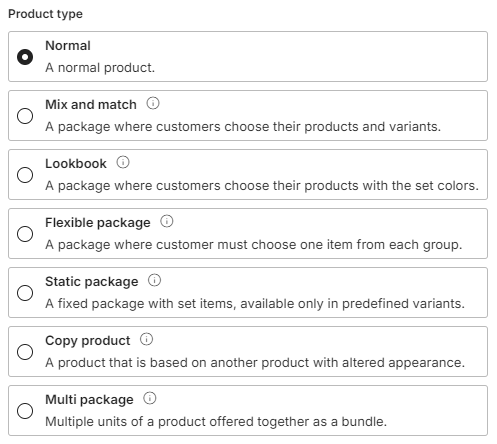
When creating a new product in Viskan Backoffice, choosing the correct product type is the first and most critical step. The product type determines how the product behaves in the online store, how it is displayed in the shopping cart, and what options are available to the customer.
Identifying product types in the list
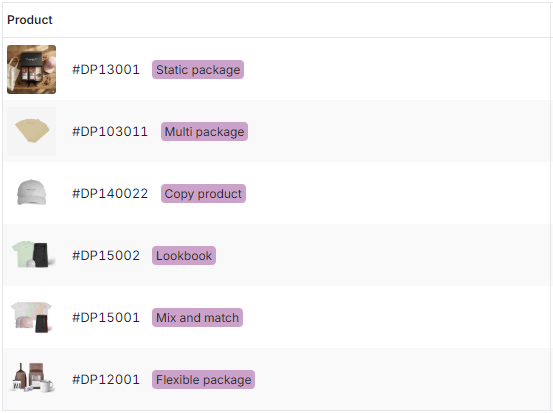
When browsing your catalog in the products list view, you can quickly identify the specific configuration of a product without opening it.
Every package or linked product displays a purple badge next to its product number, clearly indicating its type (e.g., Static package, Copy product, Mix and match).
You can also use the filters in the list view to search specifically for these types. For example, if you only want to review your bundles, you can filter the list to show only Flexible packages or Lookbooks.
Normal products
This is the standard product type used for the majority of items (e.g., a t-shirt, a bottle of shampoo). It has its own stock, prices, and variants.
Package products
Package products allow you to bundle multiple items together. The PIM offers several specialized package types to handle different sales scenarios.
Mix and Match
A package designed to offer maximum freedom to the customer.
- Customer experience: Customers choose their specific products and variants freely within the package limits.
- Cart behavior: Selected products appear as separate items in the shopping cart.
- Attributes: You can set a default color, but the customer can freely mix both color and size.
Lookbook
This type is ideal for selling a curated "look" or outfit where you want to control the aesthetic.
- Customer experience: Customers choose sizes, but the colors are fixed by you to maintain the specific look.
- Cart behavior: Selected products appear as separate items in the shopping cart.
- Attributes: You set the default color, and the customer cannot change it.
Flexible Package
Use this type when you want to let the customer build a bundle from specific groups of items.
- Customer experience: The customer chooses one item from each defined group (e.g., "Choose 1 Top" and "Choose 1 Bottom").
- Cart behavior: Appears as a single product in the shopping cart.
- Pricing: A base price is set for the package, but the total price can vary depending on which products the customer selects.
- Attributes: The customer can choose all attributes (like color/size) for the content products.
Static Package
A fixed bundle where the contents are pre-determined.
- Customer experience: The customer buys the package as a single unit. They can choose one variant of the package itself (e.g., "Gift Box Size"), but they cannot alter the individual contents.
- Cart behavior: Appears as a single product in the shopping cart.
- Use case: Ideal for gift boxes, starter kits, or fixed sets.
Linked products
These product types allow you to sell the same physical item in different ways. They connect to your existing stock, so your inventory stays accurate no matter which version the customer buys.
Copy Product
A copy that acts like a unique product in the store but is actually the same physical item.
- How it works: It allows you to create a product with a completely new name, description, or image, but links it to an original product for inventory.
- Stock: When the customer buys the "Copy," stock is deducted from the "Original."
- Use case: Unisex Merchandising. Present the same physical product in different ways. For example, a beanie can be listed under "Women" with a female model and "Men" with a male model. Both listings sell the same item and share the same stock level.
Multi Package
A bundle containing multiple units of the exact same product.
- How it works: You offer a bulk pack (e.g., a "3-Pack" of socks) that links to the original single sock product.
- Stock: When sold, the system automatically deducts the correct quantity (3) from the original product's stock.
- Use case: Selling items in bulk for a special price.

Managing package contents
When working with any of the package types (Mix & Match, Lookbook, Flexible, Static, etc.), a dedicated tab called Package contents will appear in the Product View.
In this tab, you define:
- Which products are included in the package.
- The logic for groups (for Flexible packages).
- Default colors or restrictions (for Lookbooks).
Note: The layout of the Package Contents tab changes dynamically based on the product type you selected during creation to guide you through the correct setup.
Transition from "Master" products
If you have used older versions of Viskan Backoffice, you may be familiar with the "Master" product type. To improve usability, the "Master" type has been retired and split into three specific types:
- Copy product: Replaces Master products that contained only 1 SKU.
- Multi package: Replaces Master products that contained multiple units of 1 SKU.
- Static package: Replaces all other complex Master product configurations.
Existing Master products have been automatically migrated to these new types.