

Help Centre
Getting started with Mímis [BETA]
Mímis is Viskans powerful AI agent integrated directly into our platform. It is designed to help you extract insights, analyze data, and navigate your system with greater efficiency.
The following guide outlines the user permissions required to access Mímis, how to manage these roles, and examples of how you can utilize the agent to query your data.
Access and permissions
Access to Mímis is controlled via User groups. To interact with the agent, a user must belong to a group that holds the specific role: "Mímis data extraction".
Automatic access for existing roles
To make the transition smooth, we have mapped the new AI capabilities to existing permissions:
- Users with role "Data search": If a user group previously held the role "Data search" they will automatically be assigned the "Mímis data extraction" role. Mímis will be available to these users immediately on launch day.
- Superusers: All Superusers automatically possess all system roles. Therefore, all Superusers will have full access to Mímis.
- Administrators: All Administrators automatically possess all system roles. Therefore, all Administrators will have full access to Mímis.
Assigning access to new users
If you need to grant Mímis access to a specific user group that does not currently have it:
- Navigate to User group settings.
- Assign the role "Mímis data extraction" to the desired group. Note: This action can only be performed by an Administrator within your organization.
Important data privacy notice!
Please be aware that the "Mímis data extraction" role grants broad visibility. Because Mímis allows for searching across the system to answer questions, assigning this role may grant users view access to data that was previously outside the scope of their specific user permissions.
Please ensure you only assign this role to users who are authorized to have this level of visibility.
Terms of use & data handling
Mímis is currently an early-stage feature and is provided "as is." While it is designed to assist with data analysis, users must verify the accuracy of the information provided. Please note that no personal data should be entered into the assistant. By using Mímis, you acknowledge that input data may be used internally to improve response quality.
Where to find Mímis
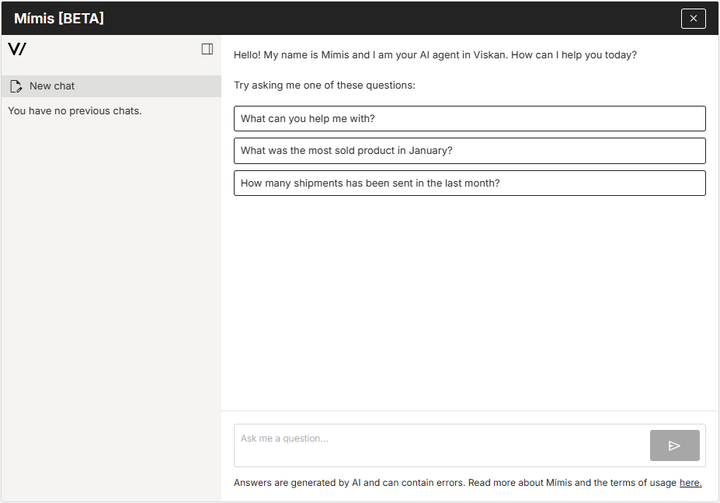
Accessing Mímis is simple. Once logged in, look for the Mímis icon located in the bottom right corner of your screen.
Clicking this icon will open the chat interface where you can immediately start asking questions about your data.

What can you ask Mímis?
Mímis is designed to act as an intelligent analyst for your e-commerce data. Here are a few examples of questions your team can ask to get immediate value.
Sales & Revenue Insights
- What was our total revenue for the last 30 days?
- Compare the number of sold products this week versus the same week last year.
- What is our Average Order Value (AOV) for the current quarter?
Product Performance
- List our top 10 best-selling products by volume this month.
- Which products have generated the highest revenue year-to-date?
- Show me a list of products that have not sold any units in the last 6 months.
Order Analysis
- How many total orders were placed yesterday?
- What is the breakdown of orders by country?
- Identify customers who have placed more than 3 orders in the last month.