

Help Centre
Product data import
How to import products in .xlsx format
Below you can find information on how to use the import module and the explanations for each field and on how to import data for different languages.
As a rule of thumb. The more data you add, the easier your life will be in the future.
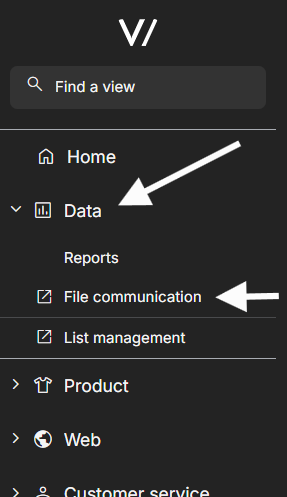
You'll find the import function by logging into the Viskan Backoffice with your credentials and choosing File Communication under Data.
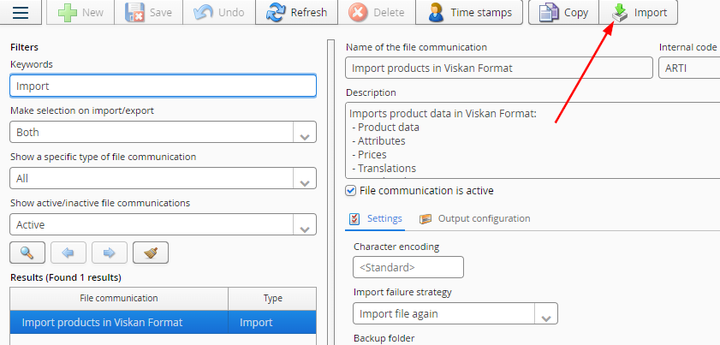
In File Communications you should find Import Products in Viskan Format import.
Choose it, and click on the Import button in the top row.
Now we're ready to bring in the file containing your product data.
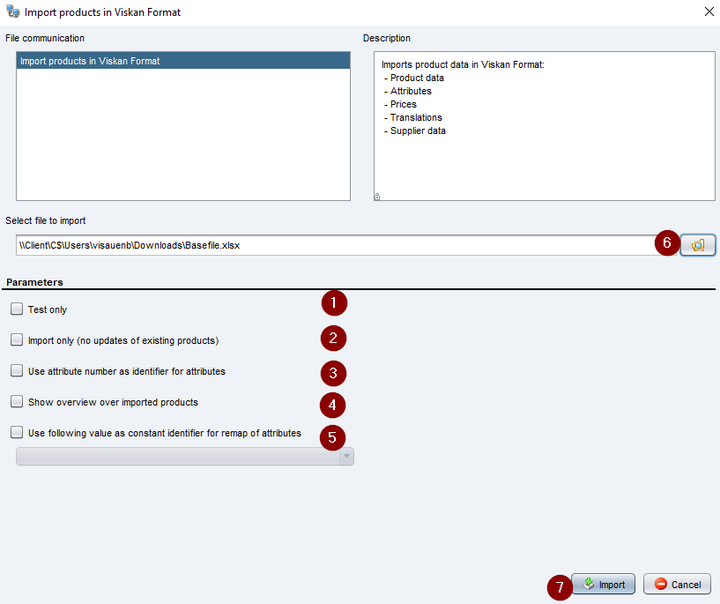
1. Test only
With this tab selected, Import only tests the integrity of your file. Useful when you're new to the import or when you've added new columns.
2. Import only
Does not replace existing product information for existing product attribute combinations.
3. Use attribute number as identifier
Matches attribute on attribute number. If unchecked, attribute code (e.g. attribute1) will be used as identifier.
4. Show overview over imported products
If selected, an overview over imported products will be displayed. This overview is same what you'll get if you run Test Only selected.
5. Use following value as constant identifier
In cases where you'd like to detect e.g. a color change. Then we need an identifier to be able to see that Black and DarkGrey is same product.
PLU-number can be such identifier. If set as identifier it will work as following:
We have a product with product number 1010 and color Black and PLU-number 1010123.
- An external system changed color name (usually attribute1) to DarkGrey.
- When importing file, we get DarkGrey with PLU-number 1010123
- Import can now detect that this PLU-number already exists, and instead of creating DarkGrey, it will replace the color attribute of Black to DarkGrey
- After import, a remap will be queued to move Black to DarkGrey.
6. Locate your file
You file can be found under your hard drive -> Users -> Your username -> File location.
All good to go! You will get a report of a successful import, or an error message if something went wrong. Contact Viskan in case any questions.
Available fields
- articleno - Product number. E.g. Prod-123 or 1010. (max 30 characters)
- attribute1 - Color of your product for internal use. (max 100 characters)
- attribute1_translation - Color of your product. External use for each translation. (max 100 characters)
- attribute1_no - Number, or code for the color. (max 100 characters)
- attribute2 - Size of your product for internal use. (max 100 characters)
- attribute2_translation - Size of your product. External use for each translation. (max 100 characters)
- attribute2_no - Number or code for the size. (max 30 characters)
- attribute3 - Third value of your product for internal use.(max 100 characters)
- attribute3_translation - Third value of your product. External use for each translation. (max 100 characters)
- attribute3_no - Number or code for the third value. (max 30 characters)
- ean13 - EAN13 code of the variant. Must be unique. (max 30 characters)
- pluno - PLU-number of the variant. Must be unique. (max 30 characters)
- active_flg - Is the product active in our system. (1 = active, 0 = inactive)
- articlename - Internal name of the product. (max 100 characters)
- language - ISO2 countrycode for the language of the translations. SE, EN, FI etc. (max 2 characters)
- articlename_translation - External name of the product. (max 100 characters)
- article_desc_translation - Current language version of "short description" (no limit on characters)
- article_desc2_translation - Current language version of "long description" (no limit on characters)
- article_internet_flg - Is the article active in Web store. (1 = active, 0 = inactive)
- supplier_articleno - Suppliers product number. (no limit on characters)
- supplier_name - Suppliers product name. (max 60 characters)
- supplier_country_iso2 - ISO2 countrycode for supplier. (max 33 characters)
- supplier_price - Price that the supplier charges for your product. (Numeric value. Max. 19 numbers followed by 2 decimals e.g. 170.99)
- supplier_currency - EUR, SEK, USD etc. (max 3 characters)
- supplierDeliveryType - Type of supplier for each product. 0 = Standard/Normal, 1 = Drop shipping (Numeric value)
- weight - Weight of the product in grams. (Numeric value)
- volume - Volume of the product in cubic meters. If width, lenght and height are given, will be calculated automatically. (Numeric value)
- width - Width of the product in millimeters. (Numeric value)
- height - Height of the product in millimeters. (Numeric value)
- length - Length of the product in millimeters. (Numeric value)
- categories - Categories that the product is active in. Categories separated with a comma. (max 2000 characters)
- price - Current price of the product. (numeric value. Max. 19 numbers followed by 2 decimals e.g. 170.99)
- price_orig - If the price is being lowered, this field tells the original price. (numeric value. Max. 19 numbers followed by 2 decimals e.g. 170.99)
- price_rec - Recommended retail price of the product. (numeric value. Max. 19 numbers followed by 2 decimals e.g. 170.99)
- price_unit - Price of the single product if there are more than one products in the package. (numeric value. Max. 19 numbers followed by 2 decimals e.g. 170.99)
- vat - VAT of your the product in selected market. (numeric value in decimals. VAT25% = 0.25)
- country_iso2 - FI, SE, EN etc. (max 2 characters)
- currency - EUR, SEK etc. (max 3 characters)
- pricelist - Name of the pricelist if the price/product is included in. (max 30 characters)
- price_active_flg - Is the price active. (1 = active, 0 = inactive)
- internet_date_start - SKU level activation date. Tells our system if the product is Brand New and sets date for SKU level Sort in webshop. (Format YYYY-MM-DD)
-
internet_date_end - SKU level deactivation date. (Format YYYY-MM-DD)
-
sku_active_flg - Is the SKU level variant active. (1 = active, 0 = inactive)
- sku_internet_flg - Is the SKU level variant active in webshop. (1 = active, 0 = inactive)
- activation_date - Product level activation date. Tells our system if the product is Brand New and sets date Product level Sort in webshop. (Format YYYY-MM-DD)
- brand - Brand of the product (max 100 characters)
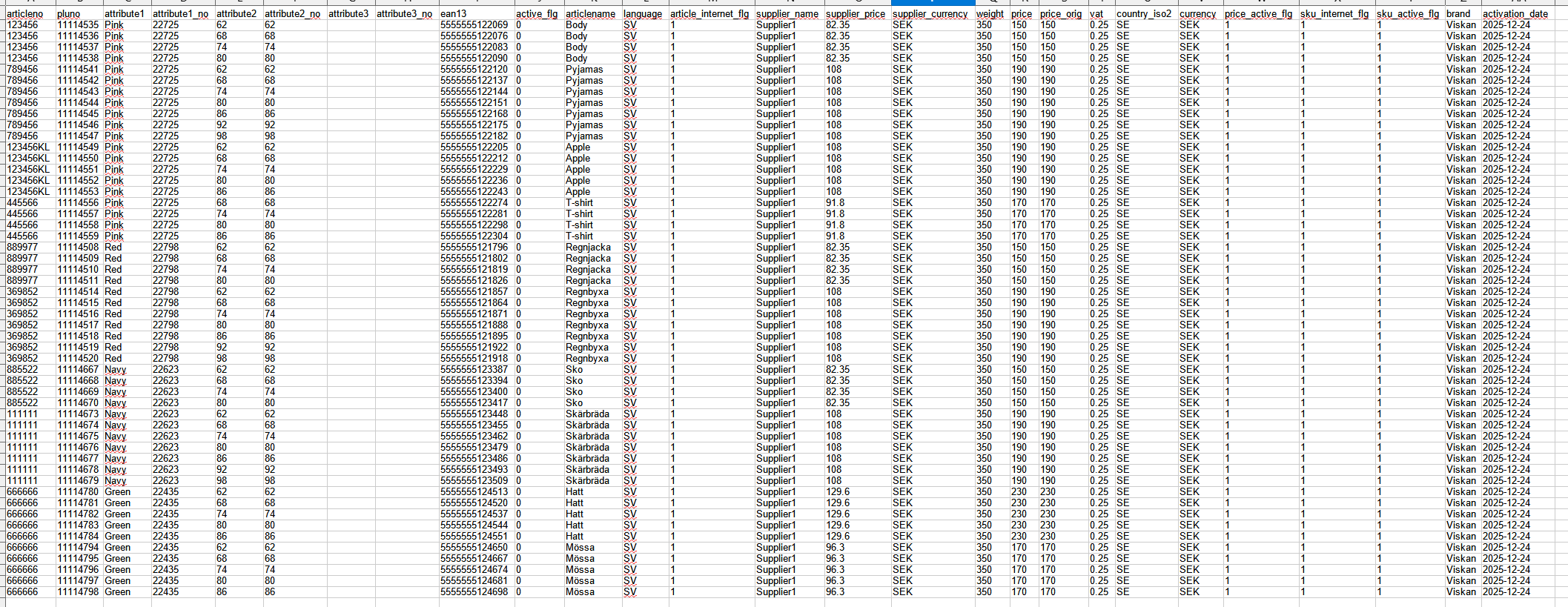
Example of file
Tips & hints
Same product in different languages - how to handle?
You will need to add a separate row for each language version of the product description, with same product number on all rows to ensure the platform knows to add all translations on the same product.
Trial & error
It is often a good method to first try out the import with a few product rows and see how it goes. The import function reports on failure and in that report you also see where the problem is. No harm done when an import fails, you just need to fix & try again.
Editor to enrich
You can always edit imported products with the product editor afterwards. If for example you find descriptions easier to do in the editor, just import the product list without descriptions and add descriptions after that in the editor where you can view two language versions of descriptions at the same time.
Still haven’t found what you’re looking for?
