

Help Centre
Introduction to the PIM
The Product Information Management (PIM) system in Viskan Backoffice is used to manage all product-related data in one place. This includes product settings, variants, translations, media, properties, package content, category placement, prices, suppliers, stock and publishing. This page provides an introduction to how the PIM is structured and what the different areas are used for.
Purpose of the PIM
The PIM is the central location where you review, adjust, and enrich product information before it becomes available in your online store.
For many customers, products are imported from an external system such as an ERP or another PIM through the Viskan API. In these cases, the PIM is used mainly for enrichment and updates.
Some customers create certain product types directly in Viskan, such as:
- Flexible packages
- Mix & Match products
- Lookbook products
Regardless of where the product originates, all product data is managed and updated in the PIM.
Main Views in the PIM
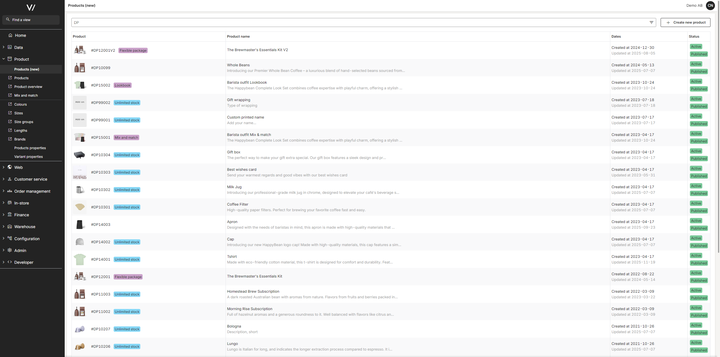
1. Products List View
This view shows all products available in your Backoffice environment. Here you can:
- Search for products
- Filter by product attributes
- Sort products
- See status information such as active, published, or missing data
- Open a product for editing
- Create new products (normal or special types)
The list view is typically used to locate products that need attention, such as missing translations or unpublished items.
2. Product View
When you open a product, you enter the Product View. This is where all editing and enrichment take place.
The Product View is organized into tabs from left to right. Each tab represents a specific area of product information. The workflow is designed so that as you move through the tabs, you complete the information needed to prepare the product for sale.
Typical tab structure includes:
- Settings – General product information
- Variants – Size, color, or other variant-level data
- Enrichment – Translations, media, properties
- Relations – Matching, Recommendations, Add-ons
- Categories – Placement in your category structure
- Prices – Basic and reduced prices
- Suppliers – Supplier-related information
- Stock– Stock levels and availability
- Publish – Final review and publishing
Note: Not all tabs are available for all product types, and some tabs may appear or disappear depending on settings and product configuration.

Common PIM Tasks
The PIM supports a wide range of operational tasks, including:
- Editing core product settings
- Adding or updating translations
- Uploading and organizing product images
- Assigning properties and selecting values
- Connecting related products, recommendations and add-ons
- Editing variant-level information
- Setting and updating prices
- Managing suppliers and stock
- Assigning products to categories
- Publishing products
Each of these areas is covered in detail in separate support pages.
Summary
The PIM is the central tool for managing product information in Viskan Backoffice. It allows you to efficiently work with all aspects of product data, whether products come from an external soruce or are created directly in Viskan.