

Help Centre
Product settings
Products are a critical part of your web store. Good product information can improve your webstore's performance in many ways - on-site and in external channels.
Viskan PIM's product settings editor enables you to modify product information easily.
Main functions
Main functions are visible in the Product settings view constantly as they are needed when updating product information.
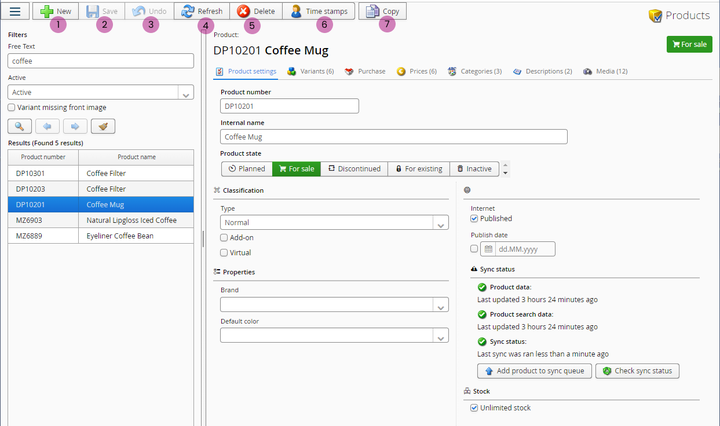
1. New - Click this when you want to create a new product. This icon opens up the "Product creation wizard" to walk you through product creation step-by-step.
2. Save - Save after making changes.
3. Undo - Revert previous action.
4. Refresh - This is good to click after saving changes. It refreshes the view and in some cases triggers saved changes to synchronize.
5. Delete - With this you can delete a product.
6. Time stamps - This function shows you the time and user for lates saved change.
7. Copy - Copy current product as new.
Search
As usual, on the left side we have the search view with three main functions:
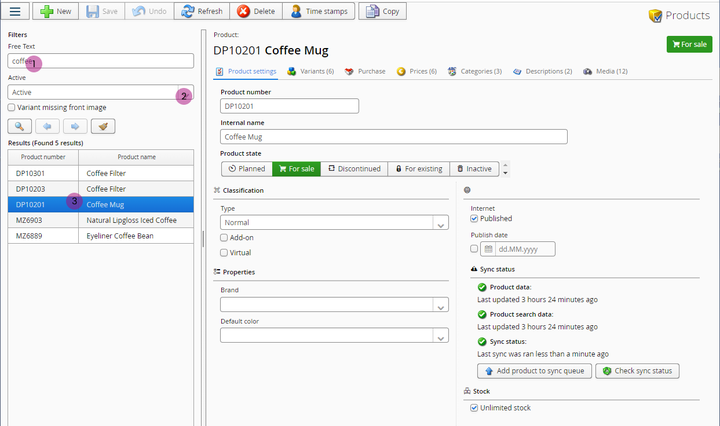
1. Enter search phrase
Write here what you want to search for: product name or product no. Just start writing and the results appear as you write2. Activity status filter
Filter search results by product status: you can search for only acitve products, only inactive or both.3. Search results
Here you can see listed search results that match given criteria. Click on a product to open it in the editor.Still haven’t found what you’re looking for?
