

Help Centre
Purchase prices
A product and it's variants can be purchased from several suppliers. In Purchase price editor you get an overview on product's purchase prices and can edit them if needed. Usually purchase prices come automatically from purchase orders so the editing part of this view usually is not needed.
Editable fields here are:
- Suppliers product number
- Purchase price excl VAT
Main functions
Main functions are quite the same as in most product editors.
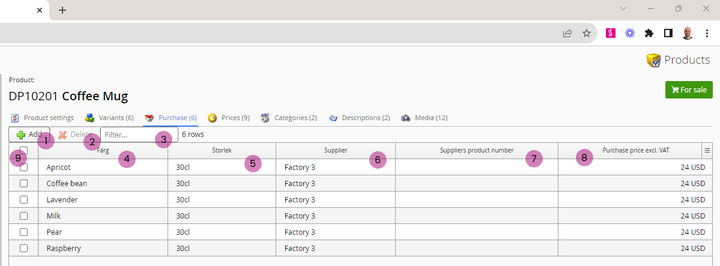
1. Add - Add a new price row for variant
2. Delete - Delete selected rows
3. Filter - Filter the view to display only certain variants
4. Color - Color variant
5. Size - Size variant
6. Supplier - Supplier of the product
7. Suppliers product number - A product number given by the supplier. This can be used to differentiate products per supplier if several suppliers deliver the same product. Also the supplier product number can be displayed in web store for SEO purposes etc.
8. Purchase price excl VAT - The purchase price for this specific supplier and currency connected to the supplier.
Still haven’t found what you’re looking for?
