

Help Centre
Prices
Main functions
On Product prices-tab we have different prices for a product and its variations. The main functions are:
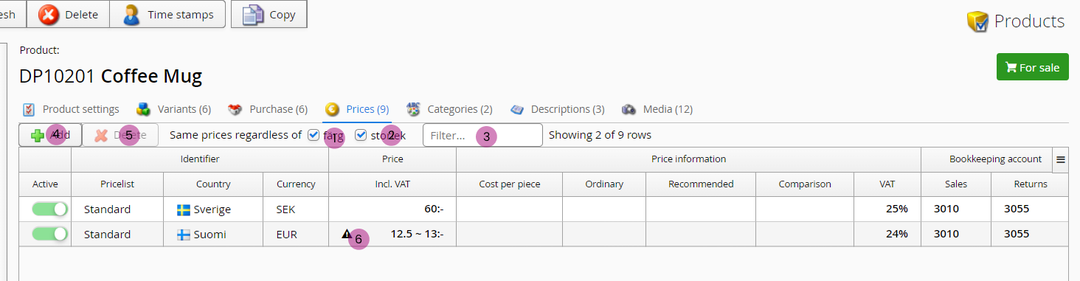
1. Same price regardless of color
This checkbox is used to "collapse" price rows for simplified view. Useful in case you don't have different prices between color variations.
2. Same price regardless of size
Same as above but with size variation.
3. Filter
Filter function to view only the rows containing value entered here.
4. Add new price row(s)
With this button you can add new price rows for a product.
5. Delete
Delete selected row(s)
6. Variation prices
Warning sign here indicates there are different prices between variations. Click on the checkboxes (1) or (2) to see all price variations.
Columns
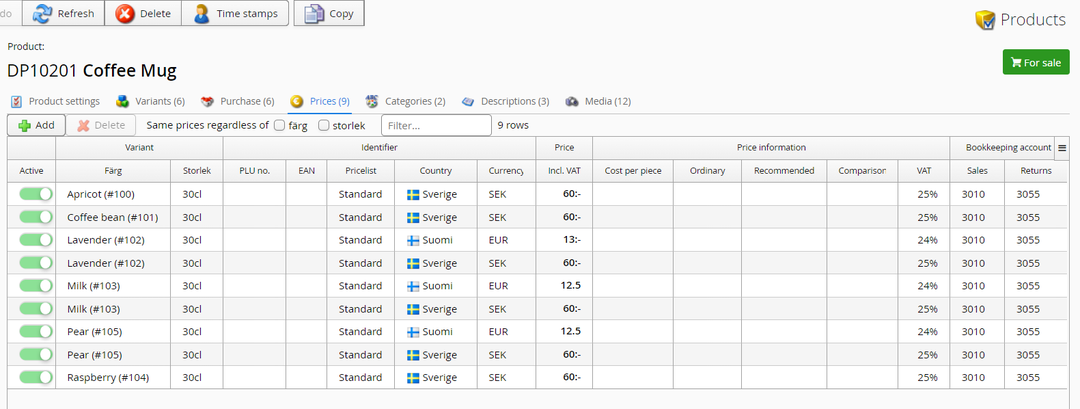
Below we have an image of a collapsed view (see checkboxes 1 & 2). As you can se, we can have different prices for each variation combination, meaning that both color and size can affect price.
Columns
Active - Activity status for the price row
Color - Color variant of the product
Size - Sive variant of the product
PLU no. - Price Lookup Unit
EAN - EAN code (EAN13)
Pricelist - If there is a pricelist-specific price, select the pricelist for this price row from dropdown list here. Otherwise just go with the default "Standard".
Country - Select which country this price is used in
Currency - Currency for this price row
Incl. VAT - The main selling price for this row. This is the default price shown in webstore and applied everywhere where there are no other rules overruling this price.
Cost per piece - Price when qty-pricing is being applied. NOTE! Applying this may need additional settings done.
Ordinary - Regular price (compared to the current price), used primarily with "price update" functionality.
Recommended - Recommended price from product supplier
Comparison - Comparison product price (this is what we specify to other companies when selling the product)
VAT - VAT-percentage, normally is auto-filled by country default VAT% but can be altered here
Sales - Sales bookkeeping account for the product, normally is auto-filled by country defaults but can be altered here
Returns - Returns bookkeeping account for the product, normally is auto-filled by country defaults but can be altered here
Tips & hints
Lowest price during the last 30 days
Looking for settings to display lowest price for a product for the last 30 days?
You find guide for that here: https://support.viskan.com/cms/lowest-price/
Still haven’t found what you’re looking for?
