

Help Centre
Main settings
Product settings
On Product settings-tab we have the basic info and settings of a product:
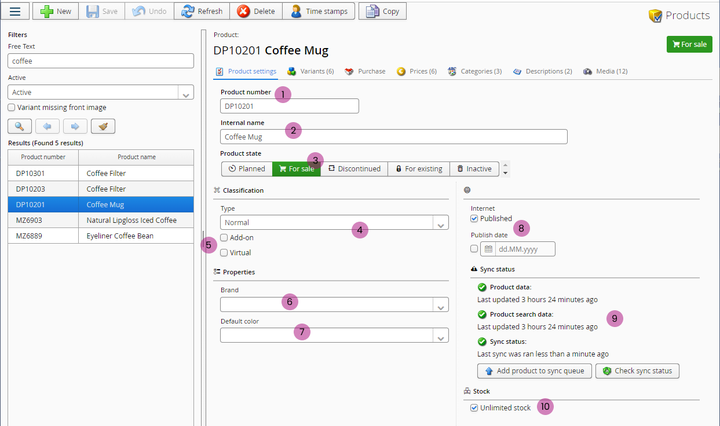
1. Product number
The product number used internally and externally. This is the product no displayed on web store, delivery notesm order confirmations etc.
2. Internal name
An internal name for the product. This is not displayed externally anywhere.
3. Product state
Describes the status of the product - most common options are "For sale" and "Inactive".
4. Product type
What type of a product is it? Options are:
- Normal
- Partial payment
- Mix and Match
- Lookbook
- Flexible packages
- Main product for a subscription
- Dummy product
5. Add-on and Virtual
With tese checkboxes you can set the product as an add-on product and/or a virtual product.
6. Brand
Here you can set a brand for the product.
7. Default color
For a product with more than one color variants, you can choose a default color. Default color is used for exmaple on category view as the product color displayed. if color variations are not displayed as separate products.
8. Publish status
Here you can set product published online. Publish date is used by "NEW"-tag on product images -> this tag is being displayed for set amount of days starting from this publish date.
9. Sync status
Whos you the status of saved changed synchronized to web store etc channels.
10. Stock
With this checkbox you can set product to have unlimited stock. NOTE! This setting alone might not change the way web store handles product's stock levels -> there might be other settings affecting that as well.
Still haven’t found what you’re looking for?
