

Help Centre
Descriptions
Language versions
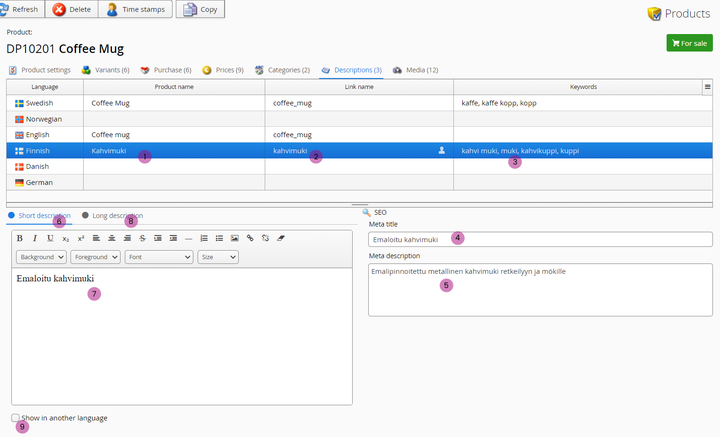
At the top-part of this editor we have product names per language version. Here you can edit names, URL's and keywords but also select which language version descriptions and meta info to edit.
It is important to remember that the product itself remains the same: stock levels, images etc. Here we only add language versions to this product to use on International sales channels.
1. Product name
Product name published in web store's language version.
2. Link name
Link-friendly name / end-part of the URL to this product. This is automatically generated based on product name (1.) but can be altered here if needed.
3. Keywords
Here you can add relevant keywords to the product to be used by search functions etc.
SEO & descriptions
4. Meta title
Meta title for search engines to use.
5. Meta description
Meta description for search engines.
6. Short description selection
Click this to add short description to the text field below.
7. Text field for descriptions
Here you can write a long or short description, depending on the selection above (6. & 8.)
8. Long description selection
Click this to add long description to text field below.
9. Show in another language
To compare and edit descriptions between two languages at the same time, click this checkbox and a product description field for another language appears.
Still haven’t found what you’re looking for?
