

Help Centre
Categories
Product categories
It's quite a simple category tree view with functions to add and remove products between categories and subcategories with a few extra functions.
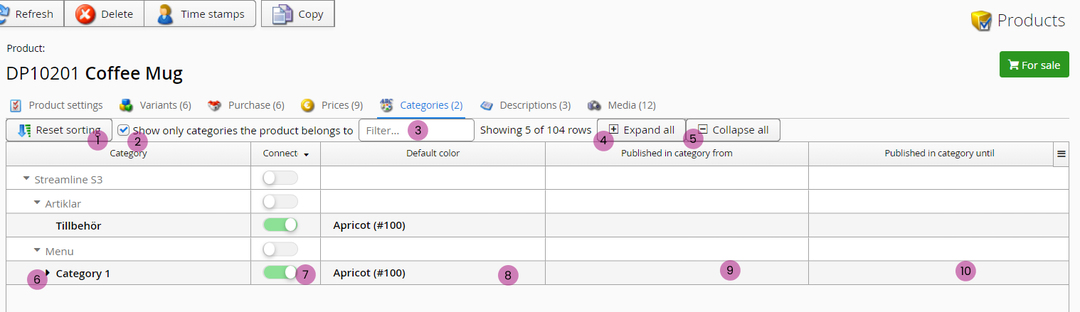
1. Reset sorting
Resets selected sorting options back to default mode.
2. Show only-checkbox
Select this checkbox to only show those categories this product belongs to.
3. Filter
The same filter function as in previous editors: filter which categories you want to view.
4. Expand all
Expands all subcategories in list below. You can also expand individual categories by clicking on them.
5. Collapse all
Collapses all subcategories in list below.
6. Category
Click here to select a category to edit. Black triangle-arrow indicates there are subcategories to this parent-category. Click on that to expand.
7. Connect
Activate this to add the product to this specific category.
8. Default color
Select the color variant image to show with this product in the category view (product list).
9. Published in category from
Date used for product category sorting selection "newest" in selected category. Does not schedule product publishing and is not supported in all installations by default.
10. Published in category to
Date used for product category sorting selection "newest" in selected category. Does not schedule product publishing and is not supported in all installations by default.
Still haven’t found what you’re looking for?
