

Help Centre
Lazy loading content
Background
Lazy loading is an effective way to optimize website performance, but it should be used strategically. One area where it is generally counterproductive is for above-the-fold content — the part of the page visible to users without scrolling.
What is above the fold content?
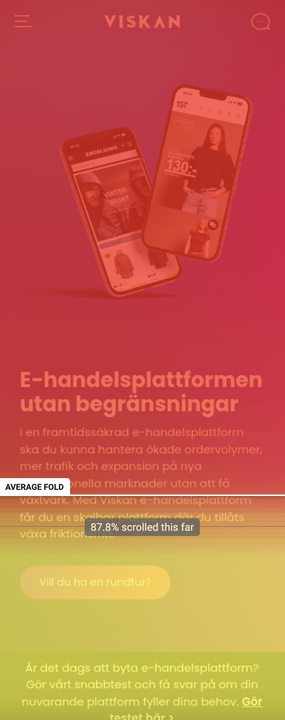
Here’s why disabling lazy loading for above-the-fold content is important for a better user experience and site performance
1. Immediate Content Visibility
Above-the-fold content is what users see first when they land on a webpage. This includes key elements like banners, navigation menus, product images, and headlines. If lazy loading is applied here, it can delay the display of this critical content, leaving users staring at blank areas or placeholders. This can make the site feel unresponsive or poorly designed, potentially causing users to leave before they even engage.
2. Improving Core Web Vitals
Google’s Core Web Vitals, which influence SEO rankings, include metrics like Largest Contentful Paint (LCP)—the time it takes for the largest visible content element to load. Lazy loading above-the-fold content can delay LCP, negatively impacting both your user experience and your search engine rankings. By ensuring this content loads immediately, you can improve your site's LCP score and overall performance metrics.
3. Enhancing User Experience (UX)
First impressions matter. Users expect websites to load quickly and display key information immediately. If they encounter delays caused by lazy-loaded above-the-fold elements, it can disrupt their journey and create frustration. A smooth and seamless experience begins with ensuring the most critical content is fully loaded when the page renders.
4. Avoiding "Pop-In" Effects
Lazy loading above-the-fold content can result in a jarring "pop-in" effect as images or elements appear after the rest of the page has already rendered. This disrupts the visual flow and can make the site appear glitchy or poorly optimized, reducing trust in the brand or platform.
5. Supporting Accessibility
Many users, especially those with slower connections or older devices, rely on above-the-fold content for immediate interaction or information. For example, a user might need to quickly see a product image or a "Buy Now" button. Lazy loading these elements can hinder accessibility, particularly for those with limited patience or bandwidth.
How to disable lazy load in Viskan CMS?
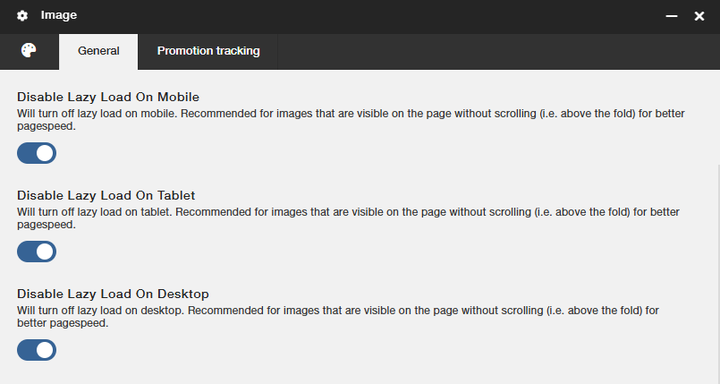
Select image and go to settings. Then disable lazy load. This can preferably be used for both content pages and product pages.
Still haven’t found what you’re looking for?
